| Key Insight | Explanation |
|---|---|
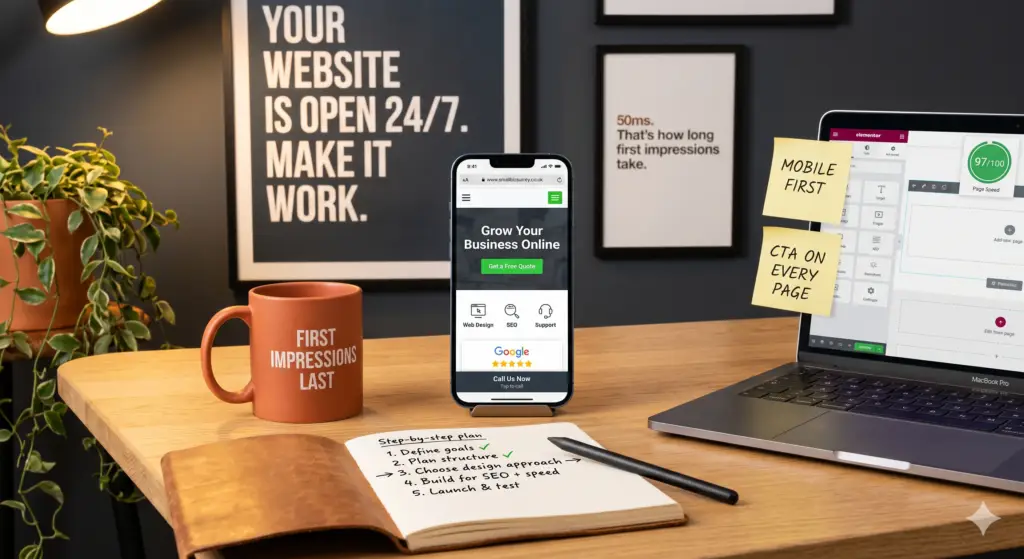
| Mobile-first design is non-negotiable | Over 60% of web traffic comes from mobile devices as of 2026. A site that breaks on a phone loses customers before they even read your first line. |
| Page speed directly affects conversions | A one-second delay in load time can reduce conversions by up to 7%. Speed is a design decision, not just a technical one. |
| DIY builders have a ceiling | Platforms like Wix and Squarespace work for very basic needs, but they can’t match the SEO depth, custom functionality, or brand differentiation a professional agency delivers. |
| Clear calls-to-action drive enquiries | Every page needs a single, obvious next step. Visitors won’t hunt for your phone number or contact form — make it impossible to miss. |
| SEO starts at the design stage | Site structure, heading hierarchy, and image optimisation all influence how Google ranks your pages. Design and SEO can’t be treated as separate projects. |
| Professional design builds trust fast | Research suggests users form a first impression of a website in as little as 50 milliseconds. An outdated or cluttered design signals risk before a word is read. |
Your website is often the first impression a potential customer gets of your business. For most small business owners, getting small business website design right feels overwhelming — too many options, too many opinions, and too little time. This guide cuts through the noise. You’ll learn exactly what makes a small business website work in 2026, how to plan and build one step by step, and how to avoid the mistakes that cost businesses real money. Whether you’re starting from scratch or refreshing an outdated site, this process takes roughly four to eight weeks depending on complexity and the approach you choose.
What Is Small Business Website Design?
Small business website design is the process of planning, building, and optimising a website specifically to meet the goals of a small or medium-sized business. It covers everything from visual layout and branding to site structure, page speed, and search engine visibility. Done well, it turns a passive online presence into an active source of enquiries and sales.
This isn’t the same as simply “making a website.” A well-designed small business site is built around user experience (UX) — meaning every decision, from font size to button placement, is made with the visitor’s behaviour in mind. According to the SBDCNet Small Business Information Center, a clear, professional website is one of the highest-return investments a small business can make [1].
Why It Matters More Than Ever in 2026
As of 2026, AI-assisted website builders have lowered the barrier to entry dramatically. Platforms like Wix now report that over half of new sites are started using their AI builder. That sounds convenient, but it also means the internet is flooded with generic, template-based sites that look alike.
The bar for standing out has risen. Customers are more discerning. A site that looked acceptable in 2021 now signals neglect. Industry analysts suggest that users form a first impression of a website in as little as 50 milliseconds — which means your design is making a case for or against your business before a single word is read [2].
Who This Guide Is For
This guide is written for small business owners who want to understand the process clearly — whether you’re planning to hire a professional agency or manage parts of the project yourself. It covers the full journey from goal-setting to launch and ongoing maintenance.
- Independent retailers, clinics, nurseries, and service businesses
- Owners refreshing an outdated site built more than three years ago
- Businesses losing enquiries to competitors with more polished online presences
- Anyone evaluating DIY builders versus hiring a professional agency
What You’ll Need Before You Start
Before any design work begins, you need to gather the right inputs. Skipping this preparation stage is the single most common reason small business website projects run over budget and over time.
Essential Assets and Information
A professional designer or agency will ask for all of these upfront. Having them ready saves weeks of back-and-forth.
- Brand assets: Your logo in vector format (.svg or .ai), brand colours (hex codes if available), and any existing brand guidelines
- Photography: High-resolution images of your premises, products, or services. Stock photography is a fallback, not a first choice.
- Business copy: A description of your services, your story, and any testimonials or case studies you can share
- Competitor reference sites: Two or three websites you admire, with notes on what specifically appeals to you
- Domain name: Your web address (e.g. yourbusiness.co.uk). If you don’t have one, register it before the project starts.
- Hosting plan: Where your website will live. Many agencies, including Three Girls Media, include hosting and support as part of their service.
Tools and Budget Considerations
The right tools depend on your approach. Here’s a quick comparison of the main options available as of 2026:
| Approach | Typical Cost (UK) | Best For | Key Limitation |
|---|---|---|---|
| DIY Builder (Wix, Squarespace) | £13–£36/month | Very early-stage businesses with minimal needs | Limited SEO, generic design, no agency support |
| Freelancer | £800–£3,500 one-off | Simple brochure sites on a tight budget | No continuity or integrated marketing post-launch |
| Professional Agency | £2,500–£10,000+ | Businesses serious about growth and enquiries | Higher upfront investment required |
According to Fusion Creative’s guide to affordable web design, the cheapest option rarely delivers the best return — especially once you factor in the time cost of managing a DIY build yourself [3].
Step 1: Define Your Goals and Audience
Define your website’s primary goal before anything else. A site without a clear purpose produces a design without a clear direction — and a visitor without a clear reason to stay.
Identify Your Primary Business Objective
Most small business websites serve one of three core purposes. Knowing which one applies to you shapes every subsequent decision.
- Generate enquiries: You want visitors to call, email, or fill in a contact form. Service businesses — clinics, nurseries, tradespeople — typically fall here.
- Sell products online: You need an ecommerce store with product pages, a shopping cart, and a payment gateway. This is a significantly more complex build.
- Build authority and trust: Your site supports an existing sales process. Visitors arrive already interested; the site needs to reassure them and answer their questions.
From experience, many small business owners try to achieve all three at once. That’s a mistake. Pick your primary goal, design the site around it, and treat the others as secondary.
Build a Picture of Your Ideal Visitor
Good small business website design starts with understanding who you’re designing for. Ask yourself:
- What is this person trying to do when they land on my site?
- What questions do they need answered before they’ll pick up the phone?
- What would make them trust me over a competitor?
- Are they browsing on a phone, or sitting at a desk?
The University of Houston SBDC notes that effective small business websites consistently address visitor questions about services, pricing, location, and trust signals — all above the fold where possible [4].
Pro Tip: Write down the three questions your customers ask most often before hiring you. Every one of those questions should be answered clearly on your homepage. If a visitor has to search for basic information, they’ll leave and call your competitor instead.
Step 2: Plan Your Site Structure and Content
Plan your site’s structure before a single pixel is designed. Information architecture (IA) — the way content is organised and labelled across a website — determines whether visitors find what they need or give up and leave.
Map Out Your Core Pages
Most small business websites need fewer pages than owners think. A focused, well-written five-page site outperforms a sprawling twenty-page site with thin content every time. Start with these essentials:
- Home: Your main pitch, key services, trust signals, and a clear call-to-action (CTA)
- About: Your story, your team, and why customers should choose you
- Services: One page per core service, with enough detail to answer questions and rank on Google
- Testimonials or Case Studies: Social proof that builds confidence in undecided visitors
- Contact: Phone number, email, address, map, and a simple form
If you’re building an ecommerce store, you’ll also need product category pages, individual product pages, and a checkout flow. That’s a separate discipline — and one where first-hand trading experience, like that of the team at Three Girls Media who have launched and exited their own ecommerce business, makes a genuine difference to the final result.
Write Content Before You Design
This is one of the most overlooked steps in small business website design. Designers need real content to make good layout decisions. Placeholder text (“Lorem ipsum”) leads to pages that look fine in a mockup and fall apart when real words go in.
For each page, write a working draft that covers:
- A headline that states the benefit, not just the feature
- Two to three sentences explaining what you do and who it’s for
- A list of key services or features
- A clear CTA (e.g. “Book a free consultation” or “Get a quote today”)
You can refine the writing later. The goal at this stage is to have real content to design around. For inspiration on what works, reviewing examples of the best small business websites can help you identify the content patterns that high-performing sites share [5].

Step 3: Choose Your Design Approach for 2026
Choose your design approach based on your budget, technical confidence, and long-term growth ambitions. The right choice depends on your specific situation — there’s no single correct answer for every business.
Understand the Trade-offs
The three main routes — DIY builders, freelancers, and professional agencies — each have genuine strengths and real limitations. The table in the prerequisites section covers costs; here’s what the numbers don’t tell you.
DIY platforms like Wix and Canva are genuinely capable tools for simple, static websites [6]. The problem is that “good enough” has a ceiling. As your business grows, you’ll hit limits on customisation, SEO control, and integration with other tools. Migrating off a DIY platform later is time-consuming and often costly.
Freelancers offer more flexibility than DIY but introduce a different risk: what happens after launch? A common complaint from small business owners is that their freelancer went quiet after the site went live, leaving them unable to make updates or troubleshoot problems. One limitation to watch for is the absence of ongoing support in freelancer contracts.
A full-service agency provides strategic input, design expertise, technical build quality, and ongoing support under one roof. At Three Girls Media, we’ve found that clients who invest in a professionally designed site from the start consistently see better returns than those who start cheap and rebuild later.
Apply the UX-Led Design Principles That Drive Results
Regardless of which route you choose, your design should follow these proven UX principles:
- Visual hierarchy: Guide the eye from the most important element (your headline) to the next action (your CTA) using size, colour, and spacing
- Responsive design: Your site must look and function correctly on every screen size, from a 27-inch desktop monitor to a small smartphone
- Consistent branding: Use the same fonts, colours, and tone throughout so every page feels like the same business
- Accessible design: Follow WCAG 2.2 accessibility guidelines (the Web Content Accessibility Guidelines) to ensure your site works for users with visual or motor impairments
- White space: Don’t cram content. Space between elements makes a page easier to read and more professional-looking.
Forbes Advisor’s research on small business website design best practices consistently highlights that clean, uncluttered layouts outperform busy designs in conversion testing [2].
Pro Tip: Before finalising your design, view every page on three different devices: a desktop, a tablet, and a phone. If anything looks broken, cramped, or hard to tap on the phone screen, fix it before launch. Most of your visitors will be on mobile.
For businesses in specialist manufacturing or technical sectors, it’s worth noting how strong visual design translates across industries. Reviewing a Custom Small Precision Machined Parts Gallery is a useful reminder that even highly technical businesses benefit from clear, well-organised visual presentation online.
Step 4: Build for Performance and SEO
Build performance and SEO into your site from day one, not as an afterthought. Search engine optimisation (SEO) is the practice of structuring your site so that Google and other search engines can find, understand, and rank your pages for relevant searches.
Technical Performance Fundamentals
A slow website loses visitors and rankings. Google’s Core Web Vitals framework — a set of measurable performance metrics introduced as a ranking factor — includes:
- Largest Contentful Paint (LCP): How long it takes for the main content to load. Target: under 2.5 seconds
- Interaction to Next Paint (INP): How quickly the page responds to user input. Target: under 200 milliseconds
- Cumulative Layout Shift (CLS): How much the page layout shifts unexpectedly as it loads. Target: under 0.1
To hit these targets, your developer should:
- Compress and properly size all images before uploading
- Use a content delivery network (CDN) to serve files from servers close to the visitor
- Minimise unnecessary scripts and third-party plugins
- Enable browser caching so returning visitors load pages faster
On-Page SEO for Small Business Websites
On-page SEO refers to the optimisation of individual page elements — titles, headings, body copy, and metadata — to signal relevance to search engines. For small businesses, local SEO is particularly important: appearing in Google’s local pack (the map results that appear for searches like “dentist near me”) can drive significant foot traffic and phone enquiries.
- Include your target keyword in the page title, H1 heading, and first paragraph
- Write a unique meta description (the short summary shown in search results) for every page
- Add your business name, address, and phone number consistently across the site
- Create a Google Business Profile and ensure it matches your website details exactly
- Build internal links between related pages to help Google understand your site structure
The University of Houston SBDC’s guidance on essential website elements emphasises that trust signals — including consistent contact details and customer reviews — are as important for search rankings as they are for visitor confidence [4].
Pro Tip: Don’t try to rank for every keyword at once. Pick two or three phrases your ideal customers actually search for — specific ones like “physiotherapy Caterham” rather than just “physiotherapy” — and build dedicated pages around each. Focused pages rank faster and convert better than generic ones.
Step 5: Launch, Test, and Maintain Your Site
Launching a website is not the finish line — it’s the starting gun. A site that isn’t actively maintained loses performance, security, and search rankings over time.
Pre-Launch Checklist
Run through this checklist before you make any site publicly visible:
- Cross-browser testing: Check the site in Chrome, Safari, Firefox, and Edge
- Mobile testing: View every page on at least two different physical devices
- Form testing: Submit every contact form and confirm you receive the notification
- Link checking: Click every navigation link and button to confirm nothing is broken
- Speed testing: Run the site through Google PageSpeed Insights and address any critical issues
- Analytics setup: Install Google Analytics 4 (GA4) and Google Search Console before launch so you have data from day one
- SSL certificate: Confirm the site loads on https:// (not http://). An unsecured site displays a warning in browsers and damages trust immediately.
Ongoing Maintenance and Support
A website needs regular attention after launch. Neglected sites accumulate security vulnerabilities, broken plugins, and outdated content that erodes both rankings and visitor trust.
Monthly maintenance should include:
- CMS and plugin updates (WordPress, for example, releases security patches regularly)
- Backup verification — confirm your backup is running and restorable
- Performance checks using Google Search Console to catch any ranking drops or crawl errors
- Content reviews to ensure prices, services, and contact details are current
In practice, many small business owners don’t have time for this. That’s why ongoing hosting and support — like the service Three Girls Media provides — is worth factoring into your budget from the start. Being left without support after launch is one of the most common and frustrating experiences small business owners report after working with freelancers or budget providers. According to Straight North’s web design guidance, post-launch support is a key differentiator between agencies that deliver long-term value and those that simply hand over a finished file [7].

Common Mistakes to Avoid
The most damaging small business website mistakes are predictable and preventable. Knowing what to watch for saves you time, money, and lost customers.
Design and Content Errors
- No clear call-to-action: Every page should have one primary next step. If visitors don’t know what to do, they leave. “Contact us” buried in the footer doesn’t count.
- Stock photography overload: Generic images of people shaking hands or staring at laptops actively undermine trust. Real photos of your business, your team, or your products perform better in almost every test.
- Too much text, too little structure: Walls of unbroken text drive visitors away. Use headings, bullet points, and short paragraphs to make content scannable.
- Inconsistent branding: Mixing fonts, colours, and tones across pages makes a site look unfinished and untrustworthy.
Technical and Strategic Errors
- Ignoring mobile users: A site that isn’t fully responsive loses over half its potential visitors before they’ve seen your content. This is not optional.
- Skipping analytics: Without data, you can’t improve. Set up GA4 and Search Console before launch, not months later.
- Building without SEO in mind: Redesigning a site that was never built for search is expensive. SEO should inform the URL structure, page titles, and heading hierarchy from day one.
- Choosing a builder you’ll outgrow: A DIY platform that works today may not support the features you need in two years. Think about where your business is heading, not just where it is now.
A Three Girls Media client recently faced exactly this situation: they’d built a site on a popular template builder three years earlier and were now unable to add the booking functionality their growing clinic needed without a full rebuild. Starting with a professionally built, scalable foundation would have saved them the cost of rebuilding from scratch.
The Clutch Creative approach to small business web design reinforces this point: building for growth from the start is almost always more cost-effective than retrofitting a site that wasn’t designed to scale [8].
Sources & References
- SBDCNet, “Website Design for Small Business”, 2026
- Forbes Advisor, “Small Business Website Design Best Practices And Examples”, 2026
- University of Houston SBDC, “4 Things Your Small Business Should Have on Its Website”, 2026
- Wix.com, “Create a Small Business Website”, 2026
Frequently Asked Questions
1. How much does it cost to get a website built for a small business?
In the UK as of 2026, professional small business website design typically costs between £2,500 and £8,000 for a custom agency build, depending on complexity, number of pages, and whether ecommerce functionality is required. DIY platforms like Wix or Squarespace cost £13 to £36 per month but come with significant limitations in SEO, customisation, and scalability. Freelancers fall in the middle at £800 to £3,500, though ongoing support is rarely included. The real cost question isn’t what you pay upfront — it’s what a poorly performing site costs you in lost enquiries every month.
2. What are the 5 golden rules of web design?
The five golden rules of effective small business website design are: (1) design for mobile first, since over 60% of traffic comes from phones; (2) establish a clear visual hierarchy that guides visitors from headline to CTA without confusion; (3) load in under 2.5 seconds, because page speed directly affects both rankings and conversions; (4) make navigation intuitive — visitors should find any page within two clicks; and (5) optimise every page for a single, specific action. Applying all five consistently is what separates sites that generate enquiries from those that simply exist online.
3. What are the 7 C’s of a website?
The 7 C’s of website design — Creativity, Consistency, Clarity, Content, Continuity, Compatibility, and Customisation — provide a practical framework for evaluating whether a site is fit for purpose. In practice, Clarity and Consistency do the heaviest lifting for small businesses: a clear message delivered in a consistent visual style builds trust faster than any design flourish. Compatibility (meaning your site works across all browsers and devices) and strong Content (copy that answers real customer questions) are the two C’s most often neglected in budget builds, and the two that cost the most in lost business when they’re wrong.
4. How long does it take to build a small business website?
A professionally built small business website typically takes four to eight weeks from initial brief to launch. Simple five-page brochure sites can be completed faster; ecommerce builds with multiple product categories, payment integration, and custom functionality take longer. The biggest variable is usually client response time — delays in providing copy, images, or feedback are the most common cause of projects running over schedule. Having your content and brand assets ready before the project starts is the single most effective way to keep to a timeline.
5. Do I need a website if I already have a social media presence?
Yes. Social media profiles are valuable, but they’re rented space — the platform controls what your audience sees and can change its algorithm or terms at any time. Your website is owned digital real estate that you control entirely. It also ranks on Google, which social media profiles generally don’t. For most small businesses, a well-designed website generates more consistent, higher-quality enquiries than any social media channel — especially when it’s backed by a solid SEO strategy.
6. What pages does a small business website need?
At minimum, a small business website needs a Home page, an About page, a Services or Products page, and a Contact page. Adding individual pages for each core service significantly improves your chances of ranking on Google for relevant searches. A Testimonials or Reviews page builds trust with undecided visitors. A Blog or News section supports SEO over time by giving search engines fresh, relevant content to index. Start lean and add pages as your business grows rather than launching with dozens of thin, underwritten pages.
Ready to Build a Website That Works?
Effective small business website design isn’t about having the flashiest site on the internet. It’s about building something clear, fast, trustworthy, and easy to find. Follow the steps in this guide — define your goals, plan your structure, choose the right approach, build for performance, and maintain it after launch — and you’ll have a site that actively wins you customers rather than sitting quietly in the background.
The difference between a site that generates consistent enquiries and one that doesn’t usually comes down to the decisions made in the planning and design stage. Getting those decisions right from the start is where professional expertise pays for itself.
Three Girls Media has been helping small and medium-sized businesses across Surrey and South London build websites that deliver real results for over a decade. Our UX-led approach, award-winning track record, and genuine ecommerce experience mean we design with your customers’ behaviour in mind, not just aesthetics. If your current site isn’t working as hard as your business does, we’d love to help you change that.
Recommended Articles
Explore more from our content library: