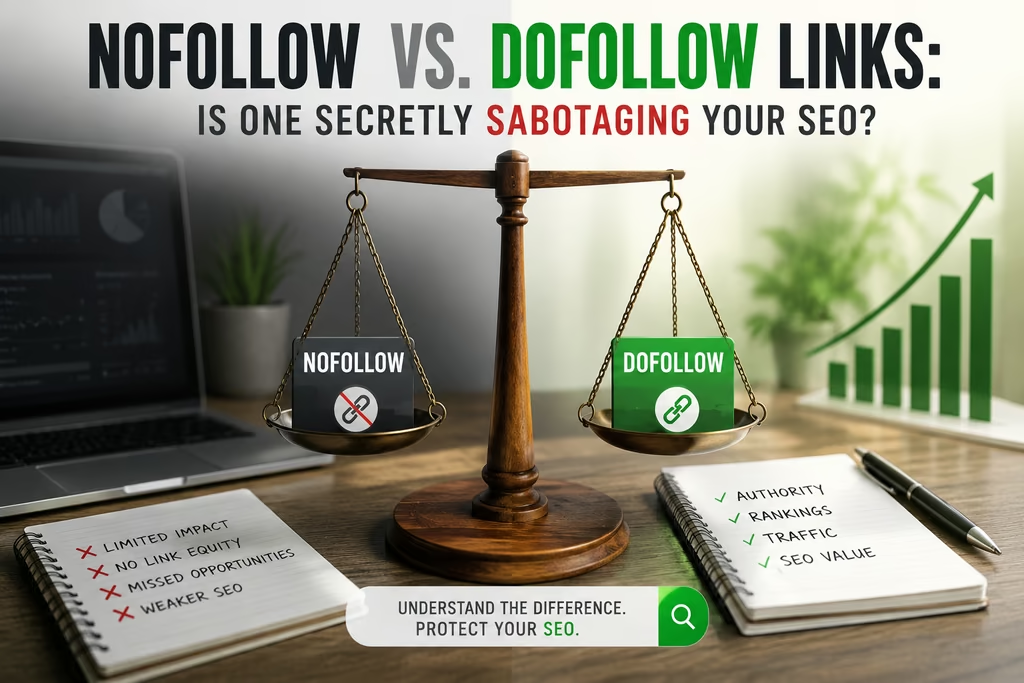
If you’ve spent any time building backlinks, you’ve probably been told to chase “dofollow” links and steer clear of anything marked nofollow. It’s advice that gets repeated so often it’s practically SEO folklore. The trouble is, it’s only half true — and treating nofollow links as worthless could mean you’re ignoring a genuinely useful part of a healthy link profile.
Here’s what’s actually going on beneath the surface of these two link types, and how to use both properly.
What a Nofollow Link Actually Is
A nofollow link is a normal hyperlink with one small addition in its HTML: the rel="nofollow" attribute. It looks like this:
<a href="https://example.com/" rel="nofollow">Click here</a>
That single attribute tells Google not to pass ranking value — often called link equity — through to the page being linked to. Google introduced the tag back in 2005 as a way to combat comment spam, and it’s since become the default setting on huge swathes of the web, including most large publishers, forums, and social platforms.
It’s worth noting that Google doesn’t treat nofollow as a strict command anymore. Since 2019, the search engine has described it as a “hint” rather than a directive, meaning Google can still choose to crawl a nofollowed page and, in rare cases, take the link’s context into account. In practice, though, nofollow links still overwhelmingly fail to pass meaningful ranking power, so it’s sensible to keep treating them that way when planning outreach or link-building work.

What a Dofollow Link Is
“Dofollow” isn’t an official term — it doesn’t exist in any HTML specification — but the industry uses it as shorthand for a link with no nofollow, sponsored, or UGC attribute attached. It’s simply the standard, unmodified link:
<a href="https://example.com/">Click here</a>
Because there’s nothing telling search engines to withhold ranking signals, dofollow links can genuinely influence how well the linked page performs in search results. This is the link type most digital PR and outreach campaigns are built around, since it directly contributes to a domain’s authority.

The Real Difference Between the Two
The gap between nofollow and dofollow comes down entirely to how search engines treat the transfer of ranking signals. A dofollow link acts as a kind of endorsement passed from one site to another. A nofollow link doesn’t carry that endorsement, at least not in the traditional sense of boosting rankings directly.
But here’s the nuance that a lot of guides skip over: a nofollow link isn’t the same as a dead or worthless link. It still functions exactly like any other link for a human visitor — it’s clickable, it drives traffic, and it can build brand recognition. The only thing missing is the direct ranking boost.
Why Nofollow Links Are Still Worth Having
They Bring Genuine Referral Traffic
Plenty of high-authority sites — Forbes is a well-known example — apply nofollow to every outbound link as standard practice, including author bylines. That doesn’t stop readers clicking through. If your brand is mentioned on a site with a large, engaged audience, a nofollow link can send a steady stream of visitors your way, even without contributing to your search rankings.
They Build Awareness That Leads to Other Links
Visibility compounds. A mention on a well-read blog or news site, nofollow or not, puts your brand in front of new audiences. Some of those readers run their own sites or write their own content, and a portion of them will link back to you organically — often without a nofollow tag attached. In that sense, a single nofollow mention can indirectly generate several dofollow links down the line.
They Keep Your Backlink Profile Looking Natural
This is the point most link-building advice underplays. Search engines are wary of backlink profiles that look artificially engineered, and a domain with nothing but dofollow links pointing to it can actually raise red flags rather than confidence. Natural link growth almost always includes a mix of both types — social shares, forum mentions, and press coverage tend to be nofollow, while genuine editorial endorsements tend to be dofollow. A balanced ratio signals organic growth rather than manipulation.
Meet the Nofollow Family: Sponsored and UGC Attributes
In 2019, Google introduced two additional attributes that sit alongside nofollow, giving site owners a more precise way to describe why a link isn’t meant to pass ranking value:
rel="sponsored" should be used for any link that’s paid for in some way — this covers sponsored content, paid placements, and affiliate links.
rel="ugc" stands for user-generated content and is meant for links appearing in comments, forum posts, or reviews that visitors add to your site themselves.
Google treats both attributes similarly to nofollow when it comes to passing ranking signals, but using the correct one gives search engines a clearer picture of your site’s link ecosystem and keeps you on the right side of Google’s webmaster guidelines on qualifying outbound links.

When to Use Nofollow (and When Not To)
Good Reasons to Add Nofollow
There are a handful of situations where applying nofollow, sponsored, or UGC tags is genuinely the right call:
Linking to a site you don’t want to vouch for — say, a competitor’s product page you’re referencing critically, or an adult or gambling site you need to mention for context — is a sensible use of rel="nofollow".
Any link that’s part of a paid arrangement, whether that’s sponsored content, an affiliate partnership, or a paid guest post, should carry rel="sponsored".
Links submitted by users through comments, forum threads, or product reviews should use rel="ugc" to stop your site becoming an easy target for spam links designed to game search rankings.
Where Nofollow Gets Misused
Years ago, some site owners tried a trick called PageRank sculpting — nofollowing every external link so that more link equity stayed concentrated on their own internal pages. Google closed that loophole a long time ago, and the practice offers no benefit today. Two habits worth avoiding:
Don’t apply nofollow across the board to every external link on your site. It doesn’t protect your rankings, and it can actively work against your credibility with search engines and readers alike.
Don’t use nofollow on internal links. If there’s a page you’d rather Google didn’t index — a login page or a thank-you page, for instance — a noindex meta tag or a properly configured robots.txt file is the correct tool for the job, not nofollow.
How to Check Whether a Link Is Nofollow
Checking a link’s attribute takes seconds. Right-click the link on any webpage and select “Inspect” (the wording varies slightly by browser). This opens the page’s source code and highlights the exact HTML element you clicked. Look inside the <a> tag for a rel attribute — if you see the word “nofollow,” “sponsored,” or “ugc” listed there, that’s your answer.
For a broader view across your entire site or a competitor’s, backlink analysis tools such as those from Semrush, Ahrefs, or Moz will break down your full link profile by attribute type, letting you filter for nofollow, sponsored, or UGC links at scale rather than checking one at a time.
Getting the Balance Right
The healthiest approach isn’t chasing dofollow links exclusively and dismissing everything else. It’s understanding what each link type is for and applying the right attribute to the right situation. Dofollow links remain the backbone of authority-building and should be the focus of most outreach and digital PR work. But nofollow links still pull real weight — driving traffic, building brand recognition, and keeping your backlink profile looking like something a real audience built organically, rather than something engineered purely for search engines.
Get that balance right, and you’re not just following a rule you read somewhere — you actually understand why it works.