Most businesses never see the customers their website loses. Nobody sends an email saying, “I nearly rang you, but your menu confused me.” They simply leave, and the next search result gets the call instead.
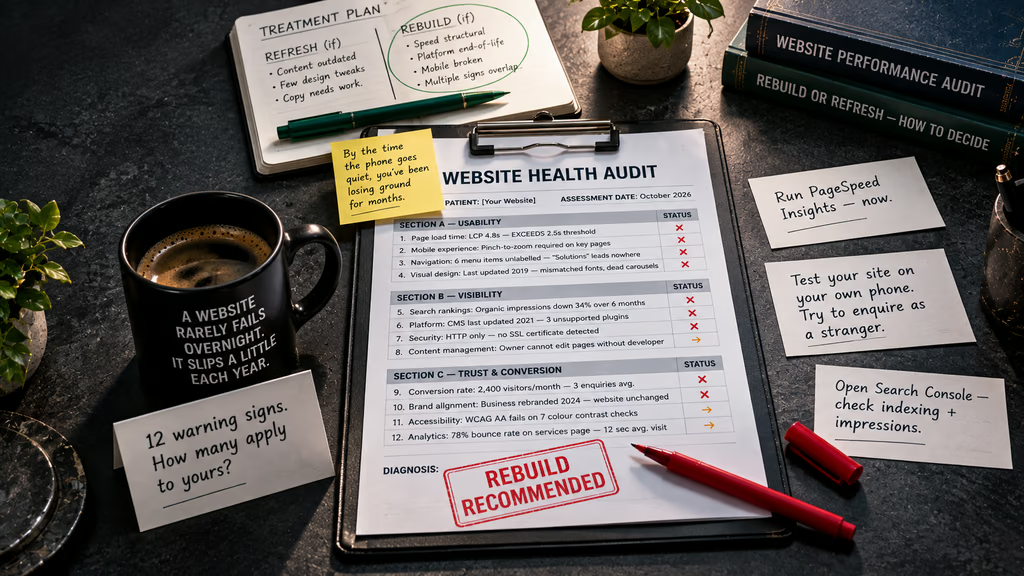
A website that once did its job can slowly become a liability as expectations, devices and search algorithms move on. Below are twelve warning signs that it’s time to think seriously about a website rebuild, grouped by what they cost you: usability, visibility and trust.
Usability Problems That Send Visitors Away
1. Your Pages Take Too Long to Load
People decide quickly whether a page is worth waiting for. Google’s Core Web Vitals set out what a good experience looks like, including a Largest Contentful Paint of 2.5 seconds or less, measured on real visits. If your main content takes noticeably longer than that to appear, visitors will bounce before they read a word.
Run your key pages through PageSpeed Insights, which shows both lab and real-user data. Compressing images or removing a plugin can sometimes help. But if the slowness comes from bloated code, an overloaded theme or years of bolted-on extras, patching rarely lasts. That’s a structural problem, and structural problems call for a rebuild.
2. It Doesn’t Work Properly on Mobile
Most people now browse on their phones, and Google predominantly uses the mobile version of your site for indexing and ranking, as it explains in its mobile-first indexing guidance. Pinching and zooming to read text, tiny buttons, or menus that vanish off the screen are all signs your site was designed for a desktop world.
Pick up your own phone and try to book, buy or enquire as a stranger would. If you feel the urge to give up, your customers already have.
3. Visitors Can’t Find What They Need
Confusing navigation is one of the most common reasons a decent business loses enquiries. Too many menu items, vague labels like “Solutions”, pages buried four clicks deep and no obvious route to your contact details all create friction.
A good structure lets someone land on any page and know within seconds where to go next. If your site has grown page by page over the years without a plan, reorganising it often means rethinking the architecture from scratch.
4. The Design Looks Dated
People judge credibility fast, and design is part of that judgement. Cluttered layouts, low-quality stock photos, tiny text, mismatched fonts and carousels nobody asked for all suggest a business that has stopped paying attention. Fair or not, visitors assume that if you haven’t looked after your website, you may not look after them either.
A new coat of paint can sometimes fix this. But if the layout itself fights modern habits, such as scrolling, thumb-friendly buttons and clear visual hierarchy, a rebuild is the cleaner route.
Visibility Problems That Hide You From Buyers
5. Your Search Rankings Have Slipped
If you’re no longer appearing for the services you offer, or your organic traffic has been drifting down for months, your site may be falling behind on technical SEO, content quality or both. Open Google Search Console and look at your performance and indexing reports. Falling impressions, pages that aren’t indexed and unresolved errors tell a story.
Some ranking problems are fixable with better content and tidier metadata. Others are baked into the build: duplicate pages, poor URL structures, thin service pages or a design that makes proper optimisation impossible. If you can’t fix it without fighting your own platform, it’s a rebuild issue.
6. It’s Built on an Ageing Platform
Outdated content management systems, abandoned themes and plugins that haven’t been updated in years are a quiet drain on performance, security and flexibility. Developers stop supporting old software, updates break things, and every small change becomes a job.
If your web developer keeps saying “we can’t do that on this setup,” or if the platform itself is no longer supported, you’re paying a growing price to stay put. Moving to a modern, maintainable foundation usually costs less in the long run than propping up something that’s reached the end of its life.
7. You Don’t Have Proper Security in Place
If your address bar shows “Not secure”, visitors will notice, and many won’t hang around. Secure HTTPS is the baseline today, and Google treats it as part of its wider page experience signals. Beyond the padlock, a neglected site with out-of-date software is an easy target for hackers.
The NCSC’s Small Business Guide is a practical starting point for the basics. If repeated hacks, spam injections or security warnings keep appearing, it’s usually a sign that the underlying build can’t be trusted any more.
8. You Can’t Update It Yourself
Think about the last time you wanted to change a price, add a new service or fix a typo. If it meant raising a ticket, waiting a week or paying a developer for ten minutes of work, your website is working against you.
A good site should let you edit text, swap images and publish new pages without touching code. When the setup is too rigid or too fragile for that, content goes stale, and stale content is bad for both customers and search engines.
Trust and Conversion Problems That Cost You Sales
9. Visitors Arrive but Nobody Enquires
Traffic that doesn’t turn into calls, form submissions or sales is a conversion problem. Perhaps your calls to action are buried, your forms ask for too much, or visitors can’t tell what you offer within a few seconds of landing.
Look at your key pages through a customer’s eyes. Is it obvious what you do, who it’s for, and what to do next? If the honest answer is “not really,” and tweaking the copy hasn’t helped, the page layouts themselves may need redesigning around how people actually decide.
10. It No Longer Reflects Your Business
Businesses change. You might have added services, moved premises, rebranded, shifted to a new audience or simply grown up. If your website still describes the company you were five years ago, it creates a gap between the promise and the reality.
Inconsistent logos, old team photos, discontinued services and outdated contact details all chip away at confidence. When the changes are this broad, it’s more efficient to rebuild the site around who you are now than to patch it page by page.
11. It Isn’t Accessible to Everyone
Accessibility is both good practice and good business. Low-contrast text, missing image descriptions, forms that can’t be completed by keyboard and videos without captions shut out a large part of your potential audience. The Web Content Accessibility Guidelines (WCAG) are the recognised standard, and UK businesses also have duties to make reasonable adjustments under the Equality Act 2010.
Retrofitting accessibility onto a poorly structured site can be painful. Building it in from the start is far simpler, and it tends to improve usability for everyone.
12. Your Analytics Show People Leaving Early
The numbers often tell you what your eyes can’t. Very high bounce rates on important pages, short visits, abandoned forms and drop-offs partway through checkout are all signs of friction. Compare your mobile and desktop behaviour, and look at where people exit.
If the same problems keep appearing despite your best efforts, the cause is usually deeper than a single page. This is the point where small fixes stop paying off.
Refresh or Rebuild: How to Decide
Not every problem justifies starting again. A site with sound foundations, a few outdated pages and some weak copy may only need a refresh. A rebuild makes more sense when several warning signs overlap, especially if they involve speed, mobile experience, platform limitations or security.
A useful rule of thumb is to ask what you’d have to change to fix the problems. If the answer is content and a few design details, refresh. If it’s the structure, the platform and the way pages are built, you’re looking at a rebuild.
Before you commit, audit what’s working. Keep the pages that rank, preserve strong content, and map old URLs to new ones so you don’t lose existing search visibility. If your site collects personal data or uses cookies, make sure the new build meets the ICO’s guidance on cookies and similar technologies.
Don’t Wait for the Enquiries to Dry Up
A website rarely fails overnight. It slips a little each year: slower than competitors, harder to use on a phone, less visible in search, less convincing to the people you most want to reach. By the time the phone goes quiet, you’ve usually been losing ground for months.
If you recognised your own site in several of these twelve signs, take it seriously. Start with the basics: test your speed, try your site on a phone, check Search Console and look at where visitors drop off. Then decide whether you’re looking at a repair job or a fresh start.
A well-planned rebuild gives you a faster, clearer and more trustworthy site that does what it should: turn visitors into customers. The sooner you act, the less it costs you in lost business.