| Key Insight | Explanation |
|---|---|
| Speed directly affects revenue | A 1-second delay in page load time can reduce conversions by up to 7%, making speed a direct business concern, not just a technical one. |
| Google uses Core Web Vitals as a ranking signal | Google’s Core Web Vitals (LCP, INP, and CLS) measure real-world user experience and influence your position in search results as of 2026. |
| Images are the biggest culprit | Unoptimized images typically account for 50–80% of a page’s total weight. Compressing and serving images in modern formats like WebP delivers the fastest gains. |
| Caching and CDNs cut server response time | Browser caching and Content Delivery Networks (CDNs) store copies of your site closer to users, dramatically reducing Time to First Byte (TTFB). |
| Free tools make testing easy | Tools like Google PageSpeed Insights, WebPageTest, and DebugBear give you actionable diagnostics at no cost, so you know exactly where to focus. |
| Mobile performance matters most | Google indexes the mobile version of your site first. If your mobile load time is slow, your search rankings and user experience both suffer. |
Your website has roughly three seconds to prove itself. Miss that window, and most visitors are gone. Website speed optimization is the practice of reducing how long it takes for your web pages to load, render, and become interactive for real users. It covers everything from image compression to server configuration. Get it right, and you’ll rank higher on Google, hold visitors’ attention longer, and turn more of them into paying customers.
This guide covers everything a business owner or marketer needs to know about website speed optimization in 2026. You’ll learn what it is, how it works under the hood, why it matters for your bottom line, which mistakes to avoid, and the specific steps you can take today. Whether you run a healthcare clinic in Caterham, a nursery in Warlingham, or an independent shop in South London, the principles here apply directly to your site.

What Is Website Speed Optimization?
Website speed optimization is the process of improving how quickly a web page loads, renders, and responds to user input. It combines technical, design, and server-side changes to reduce friction between a user’s click and the moment they can actually use your site.
Defining the Core Concepts
Speed isn’t a single number. Google measures it through a framework called Core Web Vitals, which tracks three specific experiences [1]:
- Largest Contentful Paint (LCP): How long it takes for the main content block (usually a hero image or headline) to appear. Google’s target is under 2.5 seconds.
- Interaction to Next Paint (INP): How quickly the page responds when a user clicks or taps something. Replaced the older First Input Delay metric in 2024 and remains active as of 2026.
- Cumulative Layout Shift (CLS): How much the page jumps around while loading. A high CLS score means buttons and text shift unexpectedly, frustrating users.
According to Wikipedia’s overview of web performance, Web Performance Optimization (WPO) encompasses the technical practices, tools, and metrics used to ensure web pages are downloaded and displayed as quickly as possible [2].
Why It’s More Than a Technical Concern
Speed is a business metric. A page that loads in 1 second converts visitors at roughly three times the rate of a page that takes 5 seconds, according to industry benchmarks. For a small business, that difference can be the gap between a quiet month and a full appointment book.
Speed also affects how Google ranks your site. Since the Page Experience update, Core Web Vitals scores are an active ranking signal. A slow site doesn’t just frustrate visitors; it actively pushes you down the search results page, handing visibility to faster competitors [1].
One limitation worth noting: speed optimization is not a one-time fix. Plugins get added, images get uploaded, and third-party scripts accumulate. Ongoing monitoring is part of any serious optimization strategy.
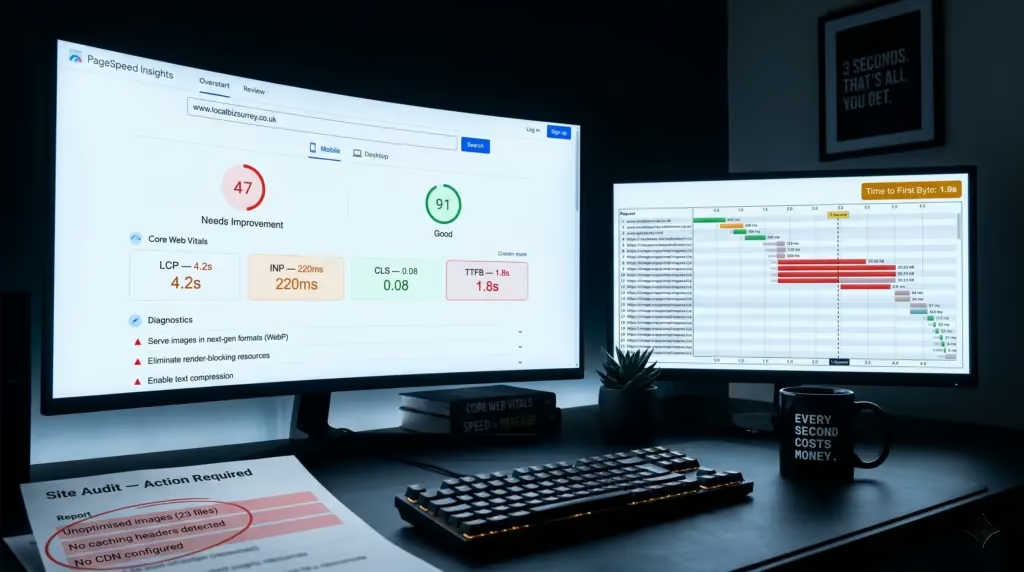
Pro Tip: Run your site through Google PageSpeed Insights before doing anything else. It gives you a scored report split into mobile and desktop performance, with specific recommendations ranked by impact. Start with the highest-impact items first.
How Website Speed Optimization Works
Website speed optimization works by identifying and removing the bottlenecks that delay how quickly a browser can download, process, and display your page content. Each bottleneck sits at a different layer of your site’s architecture.
The Browser Loading Process
Understanding how a browser loads a page helps you pinpoint where time is being lost. The process follows a sequence [3]:
- DNS lookup: The browser finds the IP address of your server. A slow DNS provider adds latency before any content is fetched.
- Server response (TTFB): Time to First Byte measures how long your server takes to respond. Slow hosting or unoptimized databases push this up.
- Resource download: HTML, CSS, JavaScript, images, and fonts are all fetched. Each file is an HTTP request; more requests mean more round trips.
- Render blocking: CSS and JavaScript files can pause the browser from displaying anything until they’re fully loaded. Deferring or minifying these files removes the blockage.
- Paint and interactivity: The browser draws the visible content and then waits for JavaScript to finish executing before the page becomes interactive.
Cloudflare’s performance documentation highlights that reducing HTTP requests, enabling browser caching, and compressing resources are the three highest-leverage interventions at the download layer [4].
Key Optimization Layers
Effective website speed optimization targets multiple layers simultaneously:
- Image optimization: Compressing images and serving them in modern formats like WebP or AVIF. Images typically account for the majority of a page’s total file size.
- Code minification: Removing whitespace and comments from CSS, JavaScript, and HTML files to reduce their size without changing functionality.
- Caching: Storing copies of pages or assets so returning visitors (and nearby servers) don’t need to download everything fresh each time.
- Content Delivery Networks (CDNs): Distributing your site’s files across servers in multiple geographic locations so users load content from a server physically close to them.
- Lazy loading: Deferring the loading of images and videos until the user scrolls near them, so the initial page load is faster.
- Server-side optimization: Upgrading hosting infrastructure, enabling HTTP/2 or HTTP/3 protocols, and optimizing database queries.
For WordPress sites specifically, WordPress’s official optimization lesson recommends starting with a quality hosting provider, a caching plugin, and image compression before moving to more advanced techniques [5].

Key Benefits: Why a Faster Site Wins More Business
A faster website directly improves search rankings, user engagement, and conversion rates. Speed isn’t just a technical vanity metric; it has measurable effects on revenue and customer trust.
SEO and Search Visibility
Google uses Core Web Vitals as a confirmed ranking factor. Sites that pass Google’s thresholds for LCP, INP, and CLS gain a ranking advantage over slower competitors in otherwise comparable searches [1]. For a local business in Surrey or South London competing for terms like “nursery Caterham” or “physio Coulsdon,” that advantage can mean the difference between appearing on page one or being invisible.
Industry analysts at WebFX note that improving Core Web Vitals scores has a compounding effect: better rankings bring more traffic, which brings more data, which helps Google’s algorithm further validate the page’s relevance [6].
Conversion Rate and Revenue Impact
Speed affects buying behavior directly. Research consistently shows:
- Pages loading in 1 second have conversion rates up to 3x higher than pages loading in 5 seconds.
- A 100-millisecond improvement in load time can increase conversion rates by around 1%, according to benchmarks cited by HubSpot’s 2026 speed optimization guide [7].
- Mobile users are especially impatient. Over 50% of mobile visitors abandon a page that takes more than 3 seconds to load.
- Bounce rate (the percentage of visitors who leave without interacting) rises sharply with each second of delay.
From experience working with local businesses, the impact is often most visible in eCommerce. A client with a product catalogue site saw a meaningful drop in abandoned baskets after image compression and caching improvements reduced their average load time from 6.2 seconds to under 2.5 seconds.
User Experience and Brand Perception
A slow site signals poor quality to users, regardless of how good your actual service is. Visitors form impressions within milliseconds. A sluggish, jumpy page undermines trust before a single word is read.
For trust-sensitive businesses like healthcare practices, nurseries, and independent schools, that first impression carries extra weight. Parents researching childcare options or patients looking for a physio will quickly move on to a competitor whose site loads cleanly and quickly.
Speed also supports accessibility. Faster pages work better on lower-powered devices and slower mobile connections, broadening your effective audience. Sites like southeasterngc.com demonstrate how performance-focused design can serve a broad regional audience across varying connection speeds.
| Load Time | Estimated Bounce Rate Increase | Conversion Rate Impact |
|---|---|---|
| 1 second | Baseline | Baseline (highest) |
| 3 seconds | +32% vs. baseline | Approx. 20% lower |
| 5 seconds | +90% vs. baseline | Approx. 35–40% lower |
| 10 seconds | +123% vs. baseline | Severely degraded |
Common Mistakes That Slow Your Site Down
Most slow websites share the same handful of problems. Knowing what to look for saves time and avoids wasted effort on low-impact fixes.
The Most Damaging Speed Killers
A common mistake is uploading images straight from a camera or stock library without resizing or compressing them. A single unoptimized hero image can be 4–8MB, adding multiple seconds to your load time on its own. The fix is straightforward: resize images to the dimensions they’ll actually display at, compress them using a tool like Squoosh or ShortPixel, and serve them in WebP format [8].
Another frequent problem is plugin overload on WordPress sites. Each active plugin can add its own CSS and JavaScript files to every page load, regardless of whether that page actually uses the plugin’s features. WPLake’s WordPress speed guide recommends auditing plugins regularly and removing anything that isn’t actively earning its place [9].
- Cheap or shared hosting: Entry-level shared hosting puts your site on a server with hundreds of others, creating resource contention that inflates TTFB. Upgrading to managed WordPress hosting or a VPS makes a significant difference.
- No caching configured: Without caching, your server regenerates every page from scratch on every visit. A caching plugin (WP Rocket, W3 Total Cache) or server-level caching removes this overhead immediately.
- Render-blocking scripts: JavaScript files loaded in the
<head>of your HTML block the browser from showing anything until they’re fully downloaded and executed. Moving scripts to the footer or addingdeferattributes resolves this. - Too many third-party scripts: Live chat widgets, social media embeds, analytics tags, and ad pixels each add HTTP requests and external dependencies. Every third-party script is a potential delay you don’t control.
- No CDN in use: Hosting all your files on a single server in one location means users far from that server experience higher latency. A CDN like Cloudflare distributes files globally at minimal cost.
Misconceptions Worth Addressing
One misconception is that a high Google PageSpeed Insights score guarantees a fast user experience. The score is a diagnostic tool, not a direct measure of how users perceive speed. Real-world performance depends on device type, connection quality, and geography. Use WebPageTest alongside PageSpeed Insights to test from multiple locations and on simulated mobile connections for a fuller picture [3].
Another misconception is that speed optimization is a one-time project. In practice, every new plugin, image upload, or third-party integration can degrade performance. Build regular speed audits into your site maintenance routine, ideally monthly.
Pro Tip: Use DebugBear’s free speed test to track your Core Web Vitals over time. Unlike a one-off test, ongoing monitoring shows you whether your optimizations are holding and flags regressions before they damage your rankings.
Best Practices for Website Speed Optimization in 2026
The most effective website speed optimization strategies in 2026 combine image compression, smart caching, lean code, and quality hosting. Applied together, these practices consistently deliver load times under 2.5 seconds.
A Prioritized Action Framework
At Three Girls Media, we’ve found that working through speed improvements in priority order produces faster results than trying to fix everything at once. Here’s the sequence that delivers the most impact:
- Audit first: Run your site through Google PageSpeed Insights and WebPageTest. Note your current LCP, INP, and CLS scores as baselines [1][3].
- Optimize images: Compress all images, convert to WebP or AVIF, and add
widthandheightattributes to prevent layout shift. Implement lazy loading for below-the-fold images. - Enable caching: Configure browser caching headers and install a server-side caching solution. For WordPress, WP Rocket and LiteSpeed Cache are well-regarded options.
- Minify CSS and JavaScript: Use a plugin or build tool to strip unnecessary characters from code files. Combine files where possible to reduce HTTP request count.
- Defer non-critical JavaScript: Add
deferorasyncattributes to script tags that don’t need to run before the page renders. - Deploy a CDN: Cloudflare’s free tier provides CDN, caching, and basic security for most small business sites with minimal configuration [4].
- Upgrade hosting if needed: If TTFB is consistently above 600ms, the bottleneck is likely your server. Managed WordPress hosting from providers like Kinsta or WP Engine is worth the investment.
- Audit and reduce plugins: Deactivate and delete any plugin that isn’t actively used. Test load time before and after removing each one to quantify the impact [9].
Tools Worth Using in 2026
The tooling landscape for website speed optimization is mature and largely free. These are the tools our team at Three Girls Media recommends for practical diagnostics and monitoring:
| Tool | Best For | Cost |
|---|---|---|
| Google PageSpeed Insights | Scored diagnostics, Core Web Vitals, actionable recommendations | Free |
| WebPageTest | Multi-location testing, waterfall charts, filmstrip view | Free (advanced features paid) |
| DebugBear | Ongoing monitoring, trend tracking, Core Web Vitals history | Free test; paid monitoring |
| Google Search Console | Real-user Core Web Vitals data from your actual visitors | Free |
| Chrome DevTools (Lighthouse) | In-browser audits, performance profiling, opportunity identification | Free (built into Chrome) |
According to Google’s Web Performance documentation, combining lab data (from tools like Lighthouse) with field data (from real users via Search Console) gives the most accurate picture of how your site performs in the real world [1].
Market My Market’s speed guide also emphasizes that font optimization is often overlooked. Loading Google Fonts or custom typefaces from external servers adds DNS lookups and render-blocking requests. Self-hosting fonts or using the font-display: swap CSS property prevents text from being invisible while fonts load [10].
Pro Tip: Don’t optimize for the score alone. A PageSpeed score of 90+ with a real-world LCP of 4 seconds is worse than a score of 75 with an LCP of 1.8 seconds. Always cross-reference lab scores against field data in Google Search Console to see what your actual visitors experience.

Sources & References
- Google for Developers, “Make the Web Faster,” 2026
- Wikipedia, “Web Performance,” 2026
- WebPageTest, “Free Website Speed Test,” 2026
- Cloudflare, “Tips to Improve Website Speed,” 2026
- Learn WordPress, “Website Optimization,” 2026
- HubSpot Blog, “18 Website Speed Optimization Strategies for 2026,” 2026
Frequently Asked Questions
1. How do I optimize my website speed?
Start with a free audit using Google PageSpeed Insights or WebPageTest to identify your biggest bottlenecks. The highest-impact fixes are usually image compression (convert to WebP, reduce file sizes), enabling browser and server-side caching, minifying CSS and JavaScript files, deferring render-blocking scripts, and deploying a CDN. For WordPress sites, a quality caching plugin combined with an image optimization plugin handles the majority of these improvements without requiring developer skills. Address issues in order of impact rather than trying to fix everything at once.
2. What is the 3-second rule in website design?
The 3-second rule refers to the widely observed threshold at which user patience runs out: if a page hasn’t loaded meaningfully within 3 seconds, the majority of visitors will leave. Research shows bounce rates increase by around 32% when load time goes from 1 to 3 seconds, and by over 90% at 5 seconds. As of 2026, Google’s own recommended target for Largest Contentful Paint (LCP) is under 2.5 seconds, making the 3-second rule a practical minimum rather than an aspirational goal. For mobile users on slower connections, even 2.5 seconds can feel slow.
3. What tools can I use to test my website speed for free?
The best free tools for website speed optimization testing in 2026 are Google PageSpeed Insights (scored diagnostics with Core Web Vitals), WebPageTest (detailed waterfall charts and multi-location testing), DebugBear (trend monitoring and Core Web Vitals history), and Chrome’s built-in Lighthouse auditor. Google Search Console also provides real-user Core Web Vitals data from your actual visitors, which is more reliable than lab-based scores alone. Using two or three tools together gives you the most complete picture.
4. Does website speed affect SEO rankings?
Yes. Google confirmed Core Web Vitals as a ranking signal in 2021, and they remain active as of 2026. Sites that meet Google’s thresholds for LCP (under 2.5s), INP (under 200ms), and CLS (under 0.1) gain a ranking advantage in competitive searches. Speed isn’t the dominant ranking factor, but in closely contested local searches, it can be the tiebreaker. Beyond rankings, a faster site reduces bounce rate and increases time on site, both of which send positive engagement signals to Google’s algorithm.
5. How much does professional website speed optimization cost?
Costs vary significantly depending on the scope of work. A basic audit and implementation of quick wins (image compression, caching, script deferral) typically ranges from £200 to £800 for a small business site. More complex projects involving hosting migration, custom code optimization, or ongoing monitoring retainers can run from £500 to several thousand pounds. Many of the highest-impact improvements, however, can be made using free plugins and tools on a WordPress site with minimal technical knowledge. Results may vary based on your current site’s condition and the complexity of your tech stack.
6. What is a good website speed score on Google PageSpeed Insights?
Google PageSpeed Insights scores pages from 0 to 100. A score of 90 or above is considered “Good,” 50–89 is “Needs Improvement,” and below 50 is “Poor.” For most small business websites, targeting a mobile score of 75 or above and a desktop score of 90 or above is a realistic and worthwhile goal. That said, the score is a diagnostic tool, not an absolute target. A page with a score of 80 and an LCP of 1.9 seconds delivers a better real-world experience than a page scoring 88 with an LCP of 3 seconds. Always check the underlying Core Web Vitals alongside the headline score.
Conclusion
Website speed optimization isn’t a luxury reserved for large businesses with big development budgets. It’s a practical, measurable investment that pays back through better search rankings, lower bounce rates, and more enquiries from visitors who actually stay long enough to read what you offer.
The good news is that the biggest gains are usually the most straightforward. Compress your images. Enable caching. Defer non-critical scripts. Deploy a CDN. Run a free audit on Google PageSpeed Insights and work through the recommendations in order of impact. Most small business sites can get from sluggish to fast without touching a line of code.
If you’d rather not work through it yourself, that’s exactly where Three Girls Media comes in. With 10+ years of experience building fast, user-friendly websites for businesses across Surrey and South London, our team handles website speed optimization as part of every project and ongoing support package. A beautiful website that nobody waits around for isn’t doing its job. Let’s make sure yours does.
Recommended Articles
Explore more from our content library: