Choosing an e-commerce platform feels like a technical decision, but it’s really a business one. The wrong choice can mean hidden fees, a site that struggles when orders pick up, or a painful migration a year down the line. The right one quietly gets on with the job while you focus on selling.
There’s no single best platform, only the best fit for your products, budget and the amount of time you can spend tinkering. Here’s how to work out which that is, with the UK-specific details that generic guides tend to miss.
Start With Your Business, Not the Platform
Be Clear About What You Sell
Selling twenty handmade candles is a different job from managing 2,000 product variations. Physical products, digital downloads, subscriptions, made-to-order items and bookable services all place different demands on a platform. Make a short list of what you can’t do without, such as variant options, stock tracking, discount codes, customer accounts or subscription billing, and judge every platform against it.
It also pays to think a year or two ahead. A platform that fits you today but caps your product count or locks features behind expensive plans will cost you more in the end.
Be Honest About Your Technical Confidence
Some platforms are designed so anyone can launch a shop in an afternoon. Others hand you far more control but expect you to manage hosting, security updates and plugins. If you’d rather spend your evenings packing orders than fixing a broken extension, say so now. Time is a cost too, and small business owners often forget to count it.
Hosted, Self-Hosted or Marketplace: Which Route Suits You?
Hosted Platforms
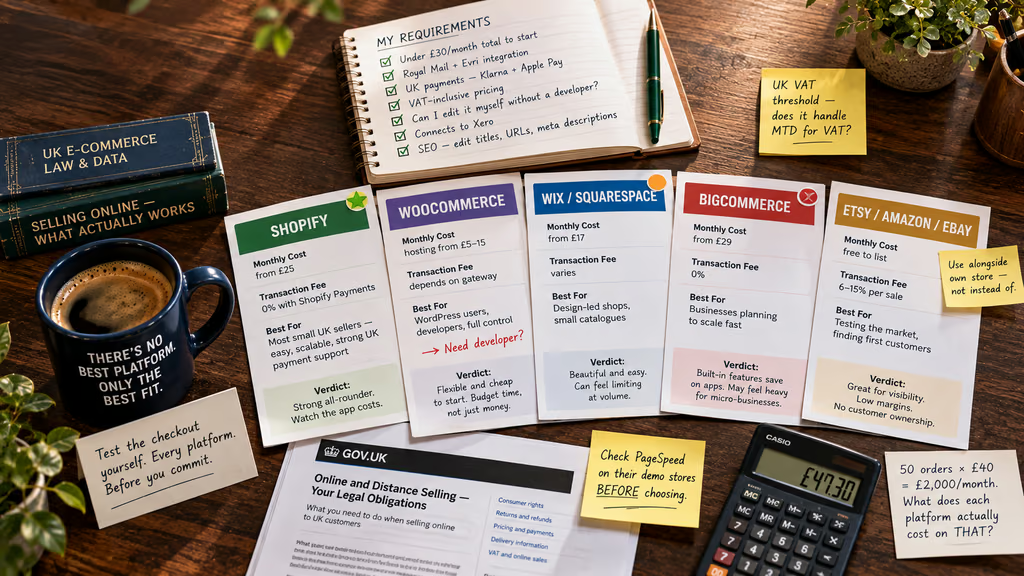
Hosted platforms such as Shopify, Wix and Squarespace look after hosting, security and updates for a monthly fee. They’re quick to set up, reliable and generally well supported, which makes them popular with first-time sellers. The trade-off is that you work within the platform’s rules, and you may pay extra for apps or advanced features.
Self-Hosted Platforms
WooCommerce is the best-known option here. It’s a free plugin for WordPress, so you pay for hosting, a theme and any extensions. You get plenty of flexibility and ownership, which suits businesses with specific requirements or developer help on hand. You also take on the responsibility for speed, backups and security.
Selling Through Marketplaces
Amazon, eBay and Etsy offer instant audiences and minimal setup, but they come with selling fees, strict rules and little control over customer relationships. Many UK small businesses use marketplaces to find customers and their own store to build loyalty and keep better margins. If you’re starting out, that combination is worth considering.
The Features and Costs That Actually Matter
The Real Cost of Selling
The monthly subscription is only the start. Add up transaction fees, payment processing charges, theme costs, paid apps, domain and hosting if relevant. Platform pricing changes regularly, so check each provider’s current pricing page rather than relying on an old comparison.
A useful exercise is to work out your total cost on, say, 50 orders of £40 a month. That puts every platform on the same footing and shows you what a sale really costs.
UK-Friendly Payments
British shoppers expect to pay in several ways: debit and credit cards, PayPal, Apple Pay and Google Pay, and increasingly buy now, pay later options like Klarna or Clearpay. Make sure your platform supports the methods your customers use, in pounds sterling, without awkward currency conversion. Fewer payment hurdles generally means fewer abandoned baskets.
Delivery and Shipping Tools
Postage is where many small shops lose time and money. Look for built-in or easy integrations with Royal Mail, Evri, DPD and other UK carriers, plus label printing, tracking emails and flexible shipping rules for things like free delivery thresholds or different rates for Northern Ireland and the Highlands. A platform that handles this smoothly will save you hours every week.
VAT and Accounting Integration
If your turnover is approaching the VAT registration threshold, your platform should handle VAT-inclusive pricing and produce clean reports. VAT-registered businesses also need to follow the rules for Making Tax Digital for VAT, so check that your store connects to accounting software such as Xero or QuickBooks. Xero’s own guide to choosing an e-commerce platform is a handy companion if you want to go deeper on this side.
SEO and Site Speed
If you want customers to find you on Google, you need a platform that lets you edit page titles, meta descriptions, URLs and image descriptions, and that produces clean, fast-loading pages. Slow shops lose shoppers, particularly on mobile. Look at the platform’s demo stores in PageSpeed Insights before you commit, since the same template can behave very differently on different platforms.
Room to Grow
Ask how easily the platform handles more products, more traffic and new sales channels. Can you add a point-of-sale system for markets, sell across social media, or offer international shipping later? Scalability doesn’t mean buying the biggest plan now. It means knowing you can upgrade without rebuilding the whole store.
Customer Support
When your checkout stops working at 9am on a Monday, support matters more than any feature. Check whether the platform offers live chat or phone help, what hours it covers, and whether there’s a decent library of guides. For self-hosted options, it’s worth knowing who you’d call: your host, a developer or a forum.
Legal and Data Requirements
Selling online in the UK comes with obligations, from clear pricing and returns information to cancellation rights. GOV.UK’s guidance on online and distance selling explains what you must tell customers and how refunds work. You’ll also be handling personal data, so familiarise yourself with the ICO’s UK GDPR guidance and make sure your platform supports cookie consent, privacy policies and secure checkout.
A Quick Look at the Popular Options
Shopify is a strong all-rounder for most small UK sellers. It’s easy to use, has a large app store, and handles payments, shipping and growth well. The costs can creep up as you add apps.
WooCommerce suits businesses that already use WordPress or want maximum control. It’s flexible and potentially cheaper at the start, but needs more maintenance.
Wix and Squarespace are good for design-led shops with a modest product range. They’re simple to manage, though they can feel limiting once your catalogue and sales volume grow.
BigCommerce appeals to businesses that expect to scale, with plenty of built-in features that would otherwise need paid apps. It can feel heavier than necessary for a very small start-up. You can explore it on the BigCommerce UK site.
Can You Switch Platforms Later?
You can, but it’s rarely painless. Moving means exporting products and customer data, redirecting old URLs to protect your search rankings, and rebuilding your design. That’s a good reason to make a careful choice now rather than rushing for the quickest setup. Before you commit, check how easily you can export your data, because a platform that makes leaving difficult is a risk in itself.
Choose the Platform That Fits Your Business
The best e-commerce platform for a small UK business is the one that matches what you sell, how technical you are, how much you can spend and where you want to be in two years. Start by writing down your needs, then compare total costs rather than headline prices. Check that payments, delivery, VAT and legal requirements work properly for the UK market, and don’t forget support and room to grow.
If you’re new to selling online, a hosted platform will usually get you trading fastest with the least stress. If you want complete control and have the time or developer support, a self-hosted option may suit you better. And if you’re still testing the market, a marketplace can be a useful first step.
Whichever route you choose, take advantage of free trials, test the checkout yourself and read the small print. A little preparation now will save you a lot of headaches, and lost sales, later.