| Key Insight | Explanation |
|---|---|
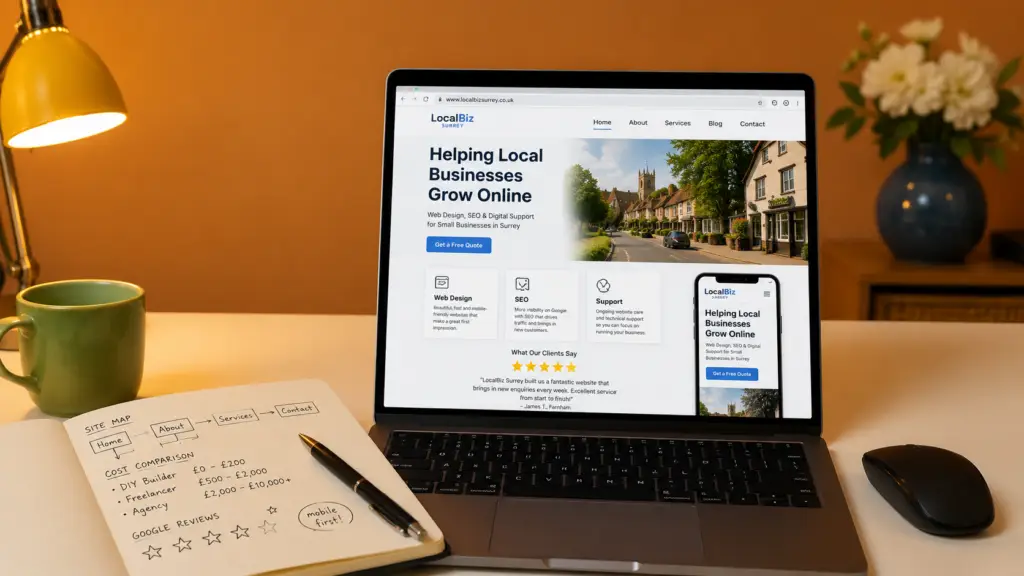
| Mobile-first design is non-negotiable | Over 60% of web traffic now comes from mobile devices. A site that isn’t optimized for smartphones loses visitors before they read a single word. |
| Speed directly affects revenue | A one-second delay in page load time can reduce conversions by up to 7%. Fast-loading pages are a basic requirement, not a bonus feature. |
| DIY builders vs. professional design | DIY platforms like Wix and Squarespace reduce upfront cost but often lack the SEO depth, custom functionality, and strategic thinking a professional agency provides. |
| Clear calls-to-action drive enquiries | Every page needs a single, obvious next step for the visitor. Without it, even beautiful websites fail to convert browsers into buyers. |
| SEO must be built in from day one | Search engine optimization (SEO) baked into the site architecture from the start is far more effective than bolting it on after launch. |
| Ongoing support prevents costly downtime | A website without maintenance can develop security vulnerabilities, broken links, and outdated content — all of which damage trust and search rankings. |
Your website is often the first impression a potential customer gets of your business. For most small business owners, getting web design for small business right is the difference between a steady stream of enquiries and a site that quietly collects digital dust. This guide walks you through every stage of the process — from setting goals to launching a site that ranks on Google and converts visitors into paying customers. Whether you’re starting from scratch or finally replacing that outdated site you’ve been embarrassed about for two years, you’ll finish this guide knowing exactly what to do next. Expect to invest a few focused hours in planning; the build itself can take anywhere from two to eight weeks depending on complexity.

Why Web Design for Small Business Matters in 2026
Good web design for small business is the foundation of your entire digital presence — it determines whether visitors stay, trust you, and take action. As of 2026, a poorly designed site doesn’t just look unprofessional; it actively costs you customers.
The Stakes Have Never Been Higher
Research consistently shows that users form a visual opinion of a website within 50 milliseconds. First impressions are almost entirely design-driven. If your site looks outdated or loads slowly, visitors leave — and they rarely come back. This is particularly relevant for web design for small business.
According to the Small Business Development Center Network (SBDCNet), a well-designed website is one of the most cost-effective marketing tools available to small businesses [1]. Yet many owners still treat it as an afterthought rather than a revenue asset.
Industry analysts suggest that by 2026, over 80% of purchase decisions — even for local, in-person services — involve some form of online research before contact. Your website isn’t just a brochure. It’s your most persuasive salesperson, working around the clock.
What a Strong Site Actually Delivers
- Credibility that makes prospects trust you before they’ve spoken to you
- Organic search visibility through built-in SEO (search engine optimization, meaning how easily Google finds and ranks your pages)
- A 24/7 enquiry channel that works while you’re with clients
- A platform for all your other marketing — social media, email, and paid ads all point back here
- Competitive differentiation, especially if your local rivals have weaker sites
At Three Girls Media, we’ve found that small businesses in sectors like healthcare, childcare, and local retail often have a significant advantage available to them: their competitors’ websites are genuinely poor. A professionally designed site can move you to the top of local search results and capture enquiries your competitors are simply missing [2].
What You’ll Need: Prerequisites and Planning
Before a single page is designed, you need a clear brief — the inputs that shape every decision that follows. Skipping this stage is the single most common reason small business websites fail to perform.
Essential Inputs Before You Start
- Domain name: Your web address (e.g., yourbusiness.co.uk). Choose something short, memorable, and matching your business name.
- Brand assets: Logo files, brand colors, and any existing marketing materials.
- Photography: Real photos of your business, team, or products outperform stock images every time.
- Core content: A clear description of what you do, who you serve, and why customers should choose you.
- Budget range: Knowing whether you’re working with £500 or £5,000 shapes every platform and partner decision.
- Timeline: Do you have a hard launch date (e.g., a seasonal promotion)? Flag it early.
Tools and Knowledge You’ll Need
You don’t need to be technical. But you do need a basic understanding of a few concepts:
- CMS (Content Management System): The software that powers your site, like WordPress or Squarespace, allowing you to update content without coding.
- Hosting: The server where your website files live. Reliable hosting affects speed and uptime.
- SSL certificate: The security layer (shown as the padlock in your browser) that protects visitor data and is required by Google for ranking.
- Analytics: Tools like Google Analytics that tell you how many people visit your site and what they do there.
The U.S. Small Business Administration outlines the core trade-off clearly: DIY platforms reduce upfront cost but require your time and limit customization, while hiring a professional costs more initially but typically delivers better results and frees you to run your business [3]. When considering web design for small business, this point stands out.
Step 1: Define Your Goals and Audience
Start by writing down exactly what you want your website to achieve — vague goals produce vague results. This is the most important step in the entire process.
Set Specific, Measurable Goals
Different businesses need different things from their sites. A physio clinic needs an online booking form and trust-building content. A local retailer needs a product catalogue and directions. An ecommerce business needs a secure checkout and fast product pages.
- List your top three business goals (e.g., generate 20 enquiries per month, rank on page one for “dentist in Caterham”, sell products online).
- Identify your primary audience — age range, location, device preference, and what problem they’re trying to solve.
- Map each goal to a specific page or feature on your site (contact form, booking widget, product page).
- Define your single most important call-to-action (CTA) — the one thing you most want visitors to do (call, book, buy, enquire).
- Research what your competitors are doing — visit their sites and note what works and what’s missing.
Pro Tip: Write a one-paragraph description of your ideal customer before briefing any designer. The more specifically you can describe who you’re trying to reach, the more targeted and effective your site’s messaging will be.
Understand the User Journey
The user journey (the path a visitor takes from landing on your site to contacting you) should be deliberately designed, not left to chance. Most small business sites need three to five pages: a homepage, an about page, a services or products page, a contact page, and ideally a blog for SEO content.
According to the University of Houston Small Business Development Center, clear contact information, a professional design, and a compelling value proposition are the three elements most likely to convert a first-time visitor into an enquiry [4].
Step 2: Choose the Right Platform or Partner
Choosing between a DIY website builder and a professional agency is the most consequential decision in your web design process — and the answer depends on your budget, goals, and how much of your own time you can realistically commit.
DIY Builders vs. Professional Agencies
| Option | Typical Cost | Best For | Limitations |
|---|---|---|---|
| Wix / Squarespace | £13–£36/month | Very early-stage or micro businesses | Limited SEO depth, template constraints, no strategic input |
| WordPress (self-managed) | £100–£500/year (hosting + plugins) | Technically confident owners who want control | Requires maintenance; security vulnerabilities if neglected |
| Freelance designer | £300–£2,000 (one-off) | Simple brochure sites on a tight budget | No ongoing support, no integrated marketing strategy |
| Full-service agency | £1,500–£10,000+ (project) | Businesses serious about growth and online visibility | Higher upfront investment; choose carefully for value |
According to Zapier’s analysis of website builders, Wix suits ease of use while Squarespace works well for service businesses — but neither replaces the strategic thinking a professional agency brings to SEO, conversion, and brand positioning [5]. For those exploring web design for small business, this matters.
What to Look for in a Web Design Partner
- A portfolio with work in your industry or a similar sector
- Transparent pricing and a clear project process
- Ongoing hosting and support after launch (not just a hand-off)
- Proven SEO knowledge built into the design process, not added later
- A track record you can verify — testimonials, case studies, or years in business
Pro Tip: Ask any prospective agency to show you a site they’ve built that ranks on page one of Google for a competitive local keyword. Rankings are the real proof of SEO capability — not just how a site looks.

Step 3: Structure Your Site for Users and Search Engines
Site structure (the way your pages are organized and linked together) affects both how visitors navigate your site and how Google crawls and ranks it. Get this right and everything else becomes easier.
Plan Your Page Hierarchy
Most small business websites need a clear, shallow hierarchy: a homepage at the top, main service or product pages one level down, and supporting content (blog posts, FAQs, case studies) one level further. Deep, confusing structures lose both visitors and search engine crawlers.
- Map your core pages before any design work begins — homepage, about, services (one page per service if possible), contact, and blog.
- Write a title and meta description for each page. These are the snippets Google shows in search results and they directly affect click-through rates.
- Choose one primary keyword per page — the specific search term you want that page to rank for.
- Link pages to each other logically using internal links (hyperlinks within your site that help both users and Google navigate).
- Create a sitemap — an XML file that lists all your pages and submits them to Google Search Console for indexing.
For businesses that sell products online, structure becomes even more critical. The Business.org guide to ecommerce website builders highlights that clear category structures and fast product pages are among the top factors in ecommerce conversion rates [6].
SEO Architecture Fundamentals
SEO architecture refers to how your site is built to be found by search engines. Key principles include:
- Clean URLs: Use readable URLs like /services/web-design rather than /page?id=42
- Heading hierarchy: Use one H1 per page (your main topic), followed by H2s and H3s to structure content logically
- Image alt text: Descriptive text attached to every image that tells Google (and screen readers) what the image shows
- Page speed: Google’s Core Web Vitals (a set of performance metrics including loading speed, visual stability, and interactivity) are a confirmed ranking factor as of 2026
Understanding how your data flows through your site is as important as its visual design. Tools like a business dashboard setup can help you monitor site performance, traffic sources, and conversion metrics in one place — giving you the visibility to make informed improvements over time.
Step 4: Design for Trust, Speed, and Conversion
Design choices — color, typography, layout, and imagery — directly influence whether visitors trust you and take action. This isn’t about aesthetics for their own sake; every design decision should serve a business purpose. This directly impacts web design for small business outcomes.
The Visual Elements That Build Credibility
Trust signals are design and content elements that reassure visitors your business is legitimate and competent. For small businesses, these matter enormously because you’re often competing against larger, better-known brands.
- Real photography: Authentic images of your premises, team, or products build more trust than generic stock photos
- Customer reviews and testimonials: Displayed prominently, ideally with names and photos
- Accreditations and memberships: Industry body logos, awards, and certifications
- Clear contact details: A physical address and phone number signal legitimacy
- Consistent branding: Matching colors, fonts, and tone across every page
According to Forbes Advisor’s guide to small business website design, consistent typography and a restrained color palette are among the most impactful design decisions a small business can make — both for professionalism and for brand recall [7].
Speed and Mobile Optimization
Mobile-first design means building your site to work perfectly on a smartphone first, then scaling up to desktop. This isn’t optional. Google uses mobile-first indexing, meaning it primarily uses the mobile version of your site to determine rankings.
- Test your site on multiple devices before launch — not just desktop.
- Compress all images to reduce file size without losing quality (tools like TinyPNG handle this automatically).
- Minimize plugins and scripts that slow page loading — every extra second costs you visitors.
- Use a reliable hosting provider with servers close to your target audience.
Pro Tip: Run your site through Google’s free PageSpeed Insights tool (search “PageSpeed Insights”) before and after launch. A score above 80 on mobile is a solid target for most small business sites.
Our team at Three Girls Media recommends treating conversion rate optimization (CRO) — the practice of improving your site to turn more visitors into enquiries — as an ongoing process, not a one-time task. Even small changes to button placement, headline wording, or form length can meaningfully increase the number of leads your site generates [8].
Step 5: Launch, Test, and Maintain Your Site
Launching a website is not the finish line — it’s the starting gun. A site that isn’t monitored and maintained will gradually lose rankings, develop technical issues, and fall behind competitors who are actively improving theirs.
Pre-Launch Checklist
- Proofread every page for spelling, grammar, and factual accuracy.
- Test all links and forms — a broken contact form is one of the most common and costly small business website errors.
- Verify Google Analytics is tracking correctly from day one.
- Submit your sitemap to Google Search Console so your pages get indexed promptly.
- Check page load speed on both mobile and desktop.
- Confirm your SSL certificate is active — the padlock should appear in every browser.
- Test your site on at least three different browsers (Chrome, Safari, Firefox).
Ongoing Maintenance: What Happens After Launch
A website without a maintenance plan is a liability. Security vulnerabilities in outdated plugins or CMS versions are one of the leading causes of small business website hacks. Regular updates, backups, and content refreshes keep your site secure and performing well. This is particularly relevant for web design for small business.
- Update your CMS, plugins, and themes monthly
- Back up your site weekly (or use automated daily backups)
- Refresh key page content at least quarterly to signal freshness to Google
- Monitor your Google Search Console for crawl errors and manual penalties
- Review your analytics monthly to spot traffic drops or high-exit pages
According to Straight North’s web design guidance, businesses that treat their website as a living marketing asset — updating content, monitoring performance, and iterating on design — consistently outperform those that launch and leave [9].
Common Mistakes to Avoid
Most small business website failures trace back to a handful of predictable mistakes — and knowing them in advance is the fastest way to avoid them.
Design and Content Mistakes
- Too much text on the homepage: Visitors scan, they don’t read. Lead with a clear headline, a brief description, and a CTA — not three paragraphs about your company history.
- No clear call-to-action: Every page should tell visitors what to do next. “Contact us”, “Book a call”, “Get a quote” — pick one per page and make it prominent.
- Using only stock photography: Generic images undermine trust. Real photos of your business, even taken on a modern smartphone, are more effective.
- Ignoring mobile users: A site that looks great on desktop but breaks on mobile will lose the majority of your visitors.
Technical and Strategic Mistakes
- Skipping SEO setup: A beautiful site that Google can’t find is useless. Keyword research, meta tags, and structured content should be part of every build from day one.
- Choosing the cheapest option without checking for support: A common pattern we see in practice: a business owner pays a low price for a website, the freelancer disappears post-launch, and the owner is left with a site they can’t update or fix.
- Not collecting analytics from day one: Without data, you’re guessing. Install Google Analytics before launch, not weeks later.
- Launching and forgetting: One pitfall to watch for is treating your website as a one-time project. The businesses that grow their online presence consistently treat their site as an ongoing investment.
The Business.com guide to website design tips emphasizes that a detailed plan created before any design work begins is the single most reliable predictor of a successful small business website [10].
Sources & References
- SBDCNet, “Website Design for Small Business”, 2026
- U.S. Small Business Administration, “Hiring a Web Developer or Using a DIY Website Builder?”, 2026
- University of Houston SBDC, “4 Things Your Small Business Should Have on Its Website”, 2026
- Zapier, “The 9 Best Website Builders for Small Business”, 2026
- Business.org, “The Best Ecommerce Website Builders of 2026”, 2026
- Forbes Advisor, “Small Business Website Design Best Practices and Examples”, 2026
- Business.com, “Small Business Website Design Tips”, 2026
Frequently Asked Questions
1. What are the 5 golden rules of web design?
The five golden rules of web design go beyond a simple checklist. First, prioritize mobile-first responsive design — build for smartphones before desktop, since that’s where most traffic arrives. Second, establish a clear visual hierarchy so visitors immediately understand what’s most important on each page. Third, ensure fast load times (under three seconds is the widely cited benchmark, but faster is always better). Fourth, create intuitive navigation that requires zero conscious thought — if users have to hunt for information, they leave. Fifth, optimize every page element for a specific conversion goal, whether that’s a phone call, a form submission, or a purchase. In practice, these rules work together: a fast, well-structured, mobile-optimized site with a clear CTA is the foundation of effective web design for small business.
2. How much does web design cost for a small business?
Costs vary widely depending on the approach. DIY platforms like Wix or Squarespace cost £13–£36 per month but require your time and have significant limitations for SEO and custom functionality. A freelance designer typically charges £300–£2,000 for a basic site, but ongoing support is rarely included. A full-service professional agency typically charges £1,500–£10,000 or more for a custom build, with ongoing hosting and support available as a retainer. The right answer depends on your goals: if you’re serious about growing online, the agency route usually delivers a better return on investment over time.
3. How long does it take to build a small business website?
A simple five-page brochure site built by a professional agency typically takes two to four weeks from briefing to launch. More complex sites with ecommerce functionality, custom integrations, or large content libraries can take six to twelve weeks. DIY builds can be faster in theory, but in practice most small business owners underestimate the time required to write content, source photography, and configure settings correctly. The most common delay in any web project is waiting for content from the client — having your copy and images ready before the project starts can cut timelines significantly.
4. Do I need a professional designer or can I use a website builder?
Both options can work, but they serve different needs. Website builders like Wix and Squarespace are genuinely capable tools for very early-stage businesses that need a basic online presence quickly and cheaply. However, they have real limitations: template constraints limit differentiation, SEO capabilities are shallower than a custom build, and you’re responsible for all updates and maintenance yourself. A professional designer or agency brings strategic thinking, SEO expertise, and ongoing support that a DIY tool simply can’t replicate. For businesses that rely on their website to generate enquiries and revenue, professional design typically pays for itself. When considering web design for small business, this point stands out.
5. What pages does a small business website need?
At minimum, a small business website needs five core pages: a homepage (your primary first impression and main conversion page), an about page (building trust and explaining who you are), a services or products page (detailing what you offer and why it matters), a contact page (with a form, phone number, address, and ideally a map), and a blog (for SEO content that attracts organic search traffic). Depending on your business, you may also need dedicated landing pages for specific services, a testimonials or case studies page, and an FAQ page. The University of Houston SBDC identifies clear contact information and a strong value proposition as the two most critical elements for converting visitors.
6. How do I make my small business website rank on Google?
Ranking on Google requires a combination of technical SEO, quality content, and local signals. Start with technical foundations: fast load times, mobile-friendly design, clean URLs, and an SSL certificate. Then focus on content: each page should target a specific keyword, use that keyword naturally in the page title, headings, and body copy, and answer the questions your customers are actually searching for. For local businesses, a verified Google Business Profile (formerly Google My Business) is essential — it’s what puts you on the map results. Consistent NAP (name, address, phone number) details across your website and online directories reinforce your local relevance. SEO is a long-term investment; most businesses see meaningful results within three to six months of a properly optimized launch.
Conclusion
Getting web design for small business right in 2026 means more than choosing a template or picking a color scheme. It means starting with clear goals, choosing the right platform or partner, building a site that search engines can find and users can trust, and treating your website as an ongoing marketing asset rather than a one-time project.
The steps in this guide give you a repeatable framework: define your goals, choose your approach, structure for SEO, design for trust and speed, launch carefully, and maintain consistently. Follow them and you’ll have a site that works as hard as you do.
Three Girls Media has spent over 10 years helping small businesses across Surrey and South London do exactly this — building beautiful, conversion-focused websites that generate real enquiries and hold their own in competitive local search results. If your current site isn’t performing the way you need it to, or you’re starting from scratch and want to get it right the first time, we’d love to talk.
Recommended Articles
Explore more from our content library: