| Key Insight | Explanation |
|---|---|
| WordPress dominates the market | As of 2026, WordPress powers roughly 60% of all CMS-built websites globally, making it the default starting point for most small businesses. |
| A CMS removes the need to code | A content management system lets non-technical users create, edit, and publish web pages through a visual interface, with no HTML required. |
| CMS type matters as much as brand | Traditional, headless, and SaaS CMS platforms each suit different business needs. Choosing the wrong type creates expensive problems later. |
| SEO and CMS are deeply linked | Your CMS choice directly affects your site’s search visibility. Built-in SEO tools, page speed, and clean code all vary significantly by platform. |
| Ecommerce needs specialist CMS features | Online stores require inventory management, payment gateways, and UX-focused product pages that general-purpose CMS platforms don’t always handle well. |
| Support matters post-launch | A CMS with no ongoing support leaves your site vulnerable. Hosting, updates, and security patches are ongoing responsibilities, not one-off tasks. |
A content management system (CMS) is software that lets you build, edit, and manage a website without writing a single line of code. For small business owners in Surrey, South London, and beyond, choosing the right CMS is one of the most consequential decisions you’ll make for your online presence. Get it right, and you have a platform that grows with your business. Get it wrong, and you’re stuck with a site that’s painful to update, slow to load, and invisible on Google. This guide cuts through the noise. We cover the most popular platforms, compare their strengths and weaknesses, and give you a clear framework for making the right call in 2026.

What Is a Content Management System?
A content management system is software that separates your website’s content from its underlying code, letting anyone on your team publish and update pages through a visual editor. According to IBM, a CMS helps users create, manage, store, and modify digital content without needing technical expertise [1]. That’s the core value proposition: your website stops being something only a developer can touch.
The Two Core Components
Every traditional CMS has two parts working together. The back end is where you log in, write posts, upload images, and manage settings. The front end is what your visitors see when they land on your site. Drupal’s official documentation describes this clearly: the CMS acts as a tool that lets users add, publish, edit, or remove content from a website using a browser-based interface [2].
Understanding this split matters because newer CMS architectures (like headless CMS) deliberately decouple the two, giving developers more flexibility. We’ll cover that in the next section.
Why a CMS Matters for Your Business
Without a CMS, updating your website means editing raw HTML files or calling your developer every time you want to change a price or publish a blog post. That’s expensive and slow. A good CMS puts you in control. You can:
- Publish new blog posts and landing pages without developer involvement
- Update product prices, opening hours, or staff profiles instantly
- Manage SEO metadata (page titles, descriptions, image alt tags) from a simple dashboard
- Control user permissions so different team members can edit different sections
- Install plugins or extensions to add new functionality as your business grows
According to Erie Institute of Technology’s beginner’s guide, a CMS application allows you to create, manage, and publish digital content for websites and apps without requiring specialist coding knowledge [3]. That accessibility is what makes these platforms the default choice for businesses of every size.
Pro Tip: Before you choose a CMS, map out who on your team will actually use it day-to-day. A platform that’s technically powerful but confusing for non-technical staff will slow you down, not speed you up. Ease of use for your actual users should rank as high as feature count.
Types of CMS Platforms Explained
CMS platforms fall into three main categories: traditional (monolithic), headless, and SaaS-hosted. Each suits a different business profile, and picking the wrong type creates costly rework down the line.
Traditional CMS (Monolithic)
A traditional CMS bundles the back end and front end together in one package. WordPress, Joomla, and Drupal are the classic examples. Acquia’s 2026 CMS guide notes that traditional platforms remain the most widely deployed because they’re familiar, well-documented, and supported by enormous plugin ecosystems [4].
Traditional CMS platforms are the right fit for most small and medium-sized businesses. They’re cost-effective, easy to manage, and supported by thousands of developers worldwide.
- Pros: Huge plugin libraries, large developer communities, straightforward hosting options, lower upfront cost
- Cons: Can become bloated with too many plugins, security updates require active management, performance can suffer without optimisation
- Best for: SMBs, blogs, service businesses, local businesses, healthcare and educational sites
Headless CMS
A headless CMS stores and delivers content via an API (application programming interface, a way for software systems to talk to each other), but doesn’t dictate how that content is displayed. Developers build the front end separately using frameworks like React or Next.js. This approach is gaining traction in 2026, particularly for businesses running content across multiple channels (website, mobile app, digital signage).
- Pros: Maximum flexibility, excellent performance, future-proof for multi-channel delivery
- Cons: Requires developer expertise, higher initial build cost, steeper learning curve
- Best for: Enterprise businesses, media publishers, multi-channel brands
SaaS CMS (Hosted Platforms)
SaaS (Software as a Service) CMS platforms like Squarespace and Wix host everything for you. There’s no server to manage, no updates to apply manually. You pay a monthly subscription and use a drag-and-drop editor. They’re accessible, but they trade flexibility for convenience.
- Pros: Zero technical maintenance, fast to launch, predictable monthly cost
- Cons: Limited customisation, weaker SEO capabilities, harder to migrate away from
- Best for: Sole traders, very small businesses, portfolio sites with minimal content needs
Best CMS Platforms for 2026
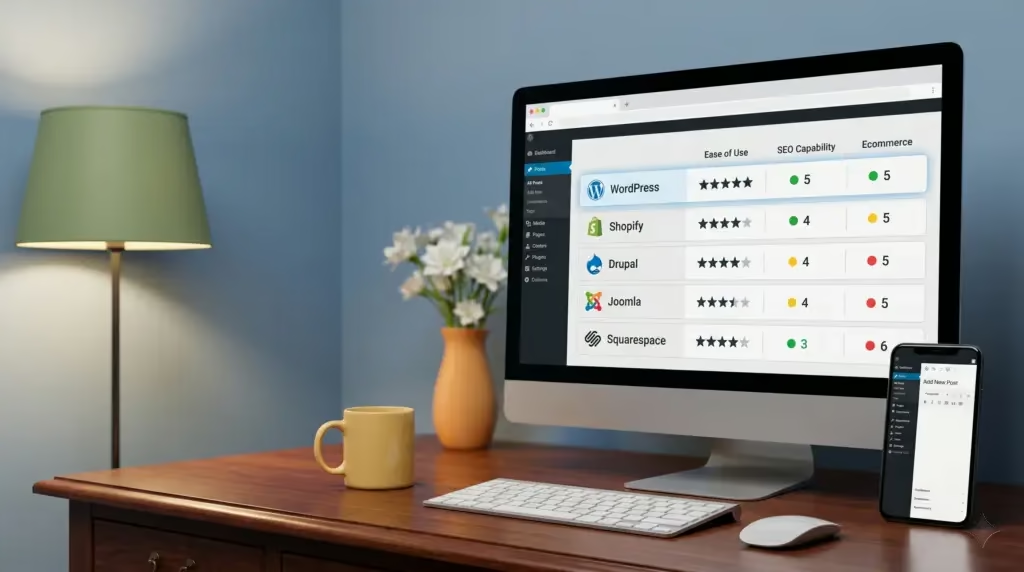
The best CMS platforms in 2026 are WordPress, Drupal, Joomla, Shopify, and HubSpot CMS, each leading in a different use case. Here’s how the major players compare.
Platform Comparison Table
| CMS Platform | Best For | Ease of Use | SEO Capability | Ecommerce | Cost (approx.) |
|---|---|---|---|---|---|
| WordPress | Most businesses | High | Excellent | Via WooCommerce | Free + hosting |
| Drupal | Complex/enterprise sites | Low (developer-heavy) | Excellent | Via modules | Free + dev costs |
| Joomla | Mid-complexity sites | Medium | Good | Via extensions | Free + hosting |
| Shopify | Dedicated ecommerce | High | Good | Native, excellent | From ~£25/month |
| HubSpot CMS | Marketing-led businesses | High | Very good | Limited | From ~£20/month |
| Squarespace | Simple portfolio/brochure | Very high | Moderate | Basic | From ~£13/month |
WordPress: The Market Leader
WordPress is the dominant platform in its category globally. As of 2026, it powers approximately 60% of all CMS-built websites, a market share no other platform comes close to matching [5]. Its open-source nature means thousands of developers contribute plugins, themes, and security patches constantly. For most small businesses, it’s the most practical starting point.
A common mistake we see is businesses choosing WordPress and then installing 40+ plugins to replicate functionality that a well-built custom theme handles natively. This bloats the site and kills page speed. A leaner build, handled by an experienced developer, always outperforms a heavily plugged-together DIY version.
Drupal and Joomla: Powerful Alternatives
Joomla is an award-winning open-source platform that suits sites needing more structure than WordPress provides out of the box, but without the developer overhead of Drupal [6]. Drupal, meanwhile, is the platform of choice for government bodies, universities, and large organisations that need granular content permissions and enterprise-grade security. According to Drupal’s own documentation, it’s designed for sites where content structure and access control are paramount [2].
For freelancers and agencies managing multiple client sites, understanding how backend systems work across these platforms is essential. Resources like What Is Backend System For Freelancers offer a practical breakdown of how backend architecture affects day-to-day site management decisions.
CMS for Small Business: What to Look For
Small businesses need a website platform that’s easy to update, affordable to run, and built to support local search visibility. The wrong choice wastes both time and budget.
Non-Negotiable Features for SMBs
From experience working with local businesses across Surrey and South London, the features that matter most aren’t always the ones vendors shout about. Here’s what genuinely moves the needle:
- Intuitive editor: Your team should be able to update pages without calling a developer. Look for a visual block editor (like WordPress’s Gutenberg) or a clean WYSIWYG interface.
- Mobile responsiveness: Over 60% of UK web traffic comes from mobile devices as of 2026. Your CMS must produce mobile-friendly output by default.
- SEO controls: You need to edit page titles, meta descriptions, header tags, and image alt text without touching code.
- Plugin/extension ecosystem: As your business grows, you’ll want to add booking forms, live chat, or email sign-up tools. A rich ecosystem means you won’t need a custom build.
- Security and update management: A CMS that doesn’t receive regular security patches is a liability. Check the platform’s release history before committing.
- Reliable hosting compatibility: Your CMS should work smoothly with reputable UK hosting providers to keep your site fast for local visitors.
A Real-World Scenario
A healthcare practice in Caterham recently came to us after struggling with a site built on a niche CMS their previous designer had favoured. Every update required going back to the original developer, at £80 per hour, for changes as simple as updating a staff member’s photo. We rebuilt the site on WordPress with a well-structured theme and trained the practice manager to handle routine updates in under two hours. That’s the difference the right platform makes.
Pro Tip: Ask any web designer which CMS they’re building on and why. If they can’t give you a clear, plain-English answer that references your specific business needs, that’s a warning sign. The platform choice should be driven by your requirements, not their preferences.
CMS and SEO Performance in 2026
Your choice of platform has a direct and measurable impact on your website’s search engine rankings. Page speed, clean code output, and built-in SEO tools all vary significantly by CMS.
How CMS Choice Affects Search Rankings
Google’s Core Web Vitals framework (a set of performance metrics measuring loading speed, interactivity, and visual stability) became a confirmed ranking factor in 2021 and remains central to SEO strategy in 2026. Your CMS affects all three metrics.
According to Kinsta’s CMS analysis, WordPress with a well-optimised theme and minimal plugins consistently achieves strong Core Web Vitals scores, particularly when paired with a quality hosting environment [7]. SaaS platforms like Squarespace have improved significantly but still lag on more complex sites.
Industry analysts consistently highlight that platforms with bloated code output or slow database queries create performance ceilings that no amount of SEO content work can overcome. The technical foundation has to be right first.
- WordPress: Excellent SEO potential with plugins like Yoast SEO or Rank Math; performance depends heavily on theme and hosting quality
- Drupal: Clean code output by default; strong for technical SEO but requires developer involvement
- Joomla: Good SEO tools built in; slightly less plugin variety than WordPress
- Shopify: Strong for product page SEO; some limitations on URL structure and blog functionality
- Squarespace: Adequate for basic SEO; limited control over technical elements
Content Strategy and CMS Integration
A CMS isn’t just a publishing tool. It’s the engine behind your content marketing strategy. Adobe’s CMS overview notes that effective platforms enable teams to maintain consistent publishing schedules, manage content taxonomies (the way content is categorised and tagged), and track performance data from a single interface [8].
For local businesses targeting searches like “physiotherapist in Coulsdon” or “nursery in Warlingham,” the ability to publish fresh, locally relevant content regularly is a direct SEO advantage. Your CMS needs to make that easy, not a chore.
Pro Tip: Don’t judge a CMS purely on its default SEO settings. The ceiling matters more than the floor. WordPress with a skilled developer and the right plugins can achieve technical SEO results that out-of-the-box Squarespace simply can’t match, regardless of how much content you publish.

How to Choose the Right CMS
Choosing the right content management system comes down to four factors: your technical capability, your budget, your growth plans, and the type of content you’ll publish. There’s no single right answer, but there is a right answer for your specific situation.
A Decision Framework
Work through these questions in order. Your answers will narrow the field quickly.
- Who will manage the site day-to-day? If it’s a non-technical team member, prioritise ease of use. WordPress and HubSpot CMS score highest here.
- What’s your primary purpose? Selling products? Shopify or WooCommerce on WordPress. Publishing content? WordPress or Ghost. Complex data structures? Drupal.
- What’s your realistic budget? Open-source platforms (WordPress, Joomla, Drupal) have no licensing fee but require paid hosting and potentially developer time. SaaS platforms have predictable monthly costs but less flexibility.
- How important is SEO to your growth? If organic search is a primary channel, lean toward WordPress or Drupal for maximum technical SEO control.
- Do you need ecommerce? If yes, WooCommerce (WordPress plugin) or Shopify are the two strongest options for SMBs in 2026.
- Will you need developer support? If you don’t have in-house technical resource, choose a platform with a large, accessible developer community so you’re never stuck.
Common Mistakes to Avoid
One pitfall to watch for: choosing a CMS based on what your web designer knows rather than what suits your business. A designer who only works in one platform will default to that platform regardless of fit. Always ask why a specific CMS is being recommended for your project.
Another common mistake is underestimating the cost of migration later. Oracle’s CMS guide highlights that switching platforms mid-growth is one of the most disruptive and expensive decisions a business can make [9]. Getting the foundation right from the start saves significant time and money over a three-to-five year horizon.
At Three Girls Media, we’ve found that most SMBs are best served by a well-built WordPress site with quality hosting, a lightweight theme, and a handful of carefully chosen plugins. It’s not the most exciting answer, but it delivers the best combination of performance, flexibility, and long-term manageability for the vast majority of our clients.
According to GeeksforGeeks’s CMS overview, these platforms are the most practical approach to building websites today, whether the goal is a blog, an ecommerce store, or a corporate presence [10]. The key is matching the platform’s strengths to your actual use case.
Sources & References
- IBM, “What is a Content Management System (CMS)?”, 2026
- Drupal.org, “Drupal as a Content Management System”, 2026
- Erie Institute of Technology, “What is a Content Management System? Beginner’s Guide to CMS”, 2026
- Acquia, “What Is a CMS? Content Management Systems Explained (2026)”, 2026
- Wikipedia, “Content Management System”, 2026
- Joomla.org, “Joomla Content Management System”, 2026
- Kinsta, “What Is a Content Management System (CMS)?”, 2026
- Adobe, “What Is a CMS? How Content Management Systems Work”, 2026
- Oracle, “What Is A Content Management System (CMS)?”, 2026
- GeeksforGeeks, “Content Management Systems: An Overview”, 2026
Frequently Asked Questions
1. What is a CMS example?
A content management system example is WordPress, which uses a back-end admin dashboard where site owners write and publish pages, and a front-end theme that displays that content to visitors. Other widely used examples include Drupal (favoured by governments and universities for its security and flexibility), Joomla (popular for community and membership sites), Shopify (built specifically for ecommerce), and HubSpot CMS (designed around inbound marketing workflows). Each handles content creation and delivery differently, but all remove the need for direct code editing on routine updates.
2. What is the easiest CMS for beginners?
WordPress is the easiest option for most beginners who want both simplicity and long-term scalability. Its Gutenberg block editor lets you build pages visually without touching code, and its plugin library means you can add almost any feature without custom development. For absolute beginners who need a site live within hours and have no growth ambitions, Squarespace or Wix are even simpler, but they trade future flexibility for that ease. As of 2026, WordPress also leads on AI-assisted content tools, with native integrations that help with SEO formatting and content suggestions.
3. Which CMS is the biggest?
WordPress is by far the largest content management system in the world. As of 2026, it powers approximately 60% of all websites that use a CMS, and around 43% of all websites on the internet regardless of platform. That dominance reflects its combination of open-source flexibility, a massive developer community, and a plugin ecosystem exceeding 60,000 extensions. Drupal and Joomla are the next largest open-source platforms, but neither comes close to WordPress’s market share. Shopify leads specifically within the dedicated ecommerce CMS category.
4. What is a headless CMS and do I need one?
A headless CMS stores and manages content in the back end but delivers it via an API rather than a built-in front-end theme. This means developers can build the customer-facing site using any technology they choose. Most small businesses don’t need a headless CMS. It’s best suited to larger organisations publishing content across multiple channels simultaneously (website, mobile app, digital displays). For a typical local business website, a traditional platform like WordPress delivers better value and far simpler day-to-day management.
5. Can I switch CMS platforms later?
You can switch platforms later, but it’s rarely straightforward. Migrating content, redirecting URLs to preserve SEO rankings, and rebuilding design elements all take significant time and budget. One limitation is that some platforms use proprietary content structures that don’t export cleanly to other systems. The best approach is to choose the right content management system from the start. If you’re unsure, WordPress offers the most flexibility for future migration if your needs change, because its content structure is well-documented and widely understood by developers globally.
6. Is a CMS good for ecommerce?
Yes, but the right platform for ecommerce depends on your product volume and complexity. Shopify is purpose-built for online selling and handles inventory, payments, and shipping natively. WordPress with WooCommerce is a strong alternative that gives you more content marketing flexibility alongside ecommerce functionality. Our team at Three Girls Media recommends WooCommerce for businesses that want strong SEO and content capabilities alongside their store, and Shopify for businesses where selling is the primary focus and content is secondary. Both are proven, well-supported platforms in 2026.
Conclusion
Choosing the right content management system is one of the most important decisions behind your website’s long-term success. The platform you build on affects how easily you can update content, how well your site performs on Google, and how much you spend on ongoing maintenance. For most small and medium-sized businesses, WordPress remains the strongest all-round choice in 2026. But the right answer always depends on your specific goals, team, and budget.
Don’t let the decision paralyse you, and don’t let anyone make it for you without a clear explanation. If you’re a local business in Surrey, South London, or the surrounding area and you want a website built on the right foundations from day one, Three Girls Media brings over 10 years of hands-on experience designing and building sites that generate real enquiries. We’ve launched our own ecommerce business and exited it successfully, so we understand what a website needs to actually perform, not just look good. Get in touch for a free, no-obligation quote.
Recommended Articles
Explore more from our content library: