If you’ve been wrestling with stagnant organic traffic despite publishing quality content, your website’s architecture might be the culprit. Most site owners obsess over keywords and backlinks while overlooking the structural foundation that determines whether search engines can even find their pages.
Website architecture—how your pages connect and organize—directly influences your ability to rank. Without proper structure, even the most valuable content gets buried where neither users nor Google can reach it.
What Makes Website Architecture Critical for SEO?
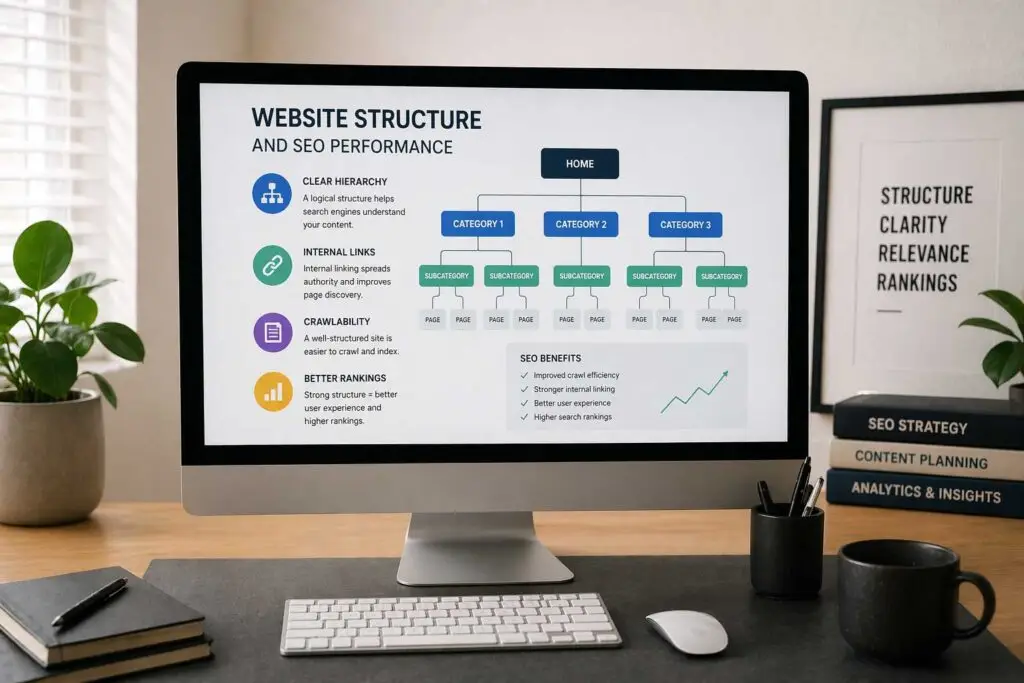
Your site’s structure shapes how search engines discover, understand, and rank your content. Google’s crawlers navigate websites through internal links. When this trail is clear and logical, crawlers efficiently index your content. When it’s messy or broken, pages remain invisible in search results.
Architecture establishes relationships between your pages. When you link from a category page to product listings, you’re telling Google these items belong together. This contextual understanding helps search engines match your pages to relevant searches.
It also distributes authority throughout your site. High-authority pages pass value to connected pages, creating a ripple effect that elevates your domain’s rankings. Without strategic internal linking, this authority gets trapped.
Clear navigation paths guide people through your sales funnel naturally, improving engagement metrics that Google watches closely.
Building Blocks of Effective Site Structure
The Flat Architecture Approach
The most effective websites minimize the distance between their homepage and any given page. A flat architecture means users reach any content within three clicks.
Compare Homepage → Category → Product versus Homepage → Main Category → Subcategory → Sub-subcategory → Product. The extra layers create friction and reduce the likelihood that crawlers will discover those buried pages.
Keep your click depth shallow. If reaching important pages requires more than three clicks, you’re making it unnecessarily difficult for both users and search engines to access your best content.
Grouping Topically Related Content
Content clusters have become essential for building topical authority. Create comprehensive “pillar” pages covering broad topics, then link to more specific “cluster” pages that dive deeper into subtopics.
For instance, a digital marketing pillar page might connect to clusters about email marketing strategies, social media tactics, content creation frameworks, and analytics tools. These interconnected pages signal to search engines that you’re an authority on the topic.
Ensure your clusters genuinely relate to their pillar and to each other. Random links between unrelated pages confuse search engines rather than helping them understand your expertise.
Eliminating Orphan Pages
Orphan pages—those without any internal links pointing to them—are discovery dead zones. Users can only reach them by typing the exact URL, and search engines might never find them at all.
Regular audits help identify orphans so you can integrate them properly into your site’s structure through strategic internal links.
Strategic Implementation for Better Rankings
Choose the Right Structural Model
E-commerce platforms typically organize around product categories and subcategories, creating a hierarchy that mirrors how customers shop. Content sites often structure by topics and subtopics.
Study your competitors’ structures. Your audience likely expects certain organizational patterns based on industry norms. Meeting these expectations reduces cognitive load and improves usability.
Map Your Information Architecture Early
Planning your structure before building saves massive headaches later. Start by identifying your core topics—these become your main categories. Then break each category into logical subcategories.
Keyword research informs this process. The topics people search for should guide your category creation. If significant search volume exists for “content marketing strategy,” that deserves its own category or substantial pillar page.
Create a visual sitemap showing how everything connects. This helps you spot gaps and opportunities before implementation.
Master Internal Linking
Internal links are the connective tissue holding your architecture together. Strategic linking passes authority, establishes relationships, and guides users through your content.
Link from high-authority pages to newer content you want to promote. Use descriptive anchor text that tells readers and search engines exactly what they’ll find. “Learn our email marketing approach” beats “click here” every time.
Each link passes a fraction of the page’s authority, so linking to 50 pages from one source spreads that value thin. Be selective and intentional.
Optimize URL Structure
Clean URLs improve both SEO and user trust. A URL like yoursite.com/blog/website-architecture-seo clearly indicates the page topic. Compare that to yoursite.com/p=12345?ref=abc which communicates nothing.
Include your primary keyword in URLs when it makes sense. Keep them concise—shorter URLs are easier to share and less likely to get truncated.
Maintain consistency in your URL patterns. If you use hyphens as word separators, use them throughout your site.
Implement Navigation That Actually Helps
Your navigation menu is simultaneously a user tool and an SEO asset. It should highlight your most important pages while remaining clean.
Dropdown menus work well for sites with extensive content, allowing you to showcase multiple category levels without overwhelming the interface. Horizontal menus suit smaller sites where all primary pages fit comfortably across the header.
Footer navigation provides a secondary touchpoint for pages that don’t warrant header placement—privacy policies, press information, and contact details.
Mobile navigation requires special attention. Most sites use hamburger menus that expand to reveal categories. Ensure these menus load quickly and work flawlessly, as mobile-first indexing means Google primarily evaluates your mobile experience.
Add Breadcrumbs for Context
Breadcrumbs show users their location: Home > Category > Subcategory > Current Page. Users can jump back to any previous level without repeatedly using the back button.
Search engines gain additional context about page relationships. Plus, breadcrumbs can appear in search results, providing extra information to potential visitors.
Implement breadcrumb structured data so search engines properly interpret and potentially display them in SERPs.
Leverage Categories and Tags
Blogs benefit from thoughtful categorization. Categories represent broad topic areas, while tags work across categories to connect related content.
A cooking blog might have categories like Breakfast, Dinner, and Desserts, with tags like Vegetarian, Quick Meals, and Kid-Friendly spanning multiple categories.
Limit your categories to prevent overwhelming visitors. Most blogs function well with 5-10 main categories, each containing multiple posts.
Create Comprehensive Sitemaps
XML sitemaps give search engines a complete roadmap of your site. They list every URL along with metadata like last modification dates, helping crawlers prioritize which pages to revisit.
Large or complex sites benefit from multiple sitemaps—one for products, another for blog posts, another for category pages. This segmentation helps search engines process your content more efficiently.
HTML sitemaps serve users who can’t find what they need through normal navigation. These provide a backup discovery method when search or menu navigation fails.
Technical Considerations That Matter
Managing Crawl Budget Wisely
Search engines allocate limited resources to crawling each site. Inefficient architecture wastes this “crawl budget” on low-value pages while important content gets ignored.
Reduce crawl waste by fixing redirect chains, eliminating duplicate content, and using robots.txt to block crawler access to unimportant pages.
Handling Site Migrations Carefully
Changing your site structure impacts existing rankings. If restructuring is necessary, implement proper 301 redirects from old URLs to new ones to preserve authority.
Document your URL mapping meticulously before making changes. Update internal links to point directly to new URLs rather than relying solely on redirects.
Monitoring Performance Continuously
Architecture isn’t “set it and forget it.” Regular audits identify issues like broken links, deep click depths, and new orphan pages. Tools like Screaming Frog and Semrush Site Audit automate much of this analysis.
Track your click depth across all pages. If important content requires more than three clicks to reach, restructure to bring it closer to your homepage.
Pay attention to pages with high exit rates. These might indicate dead ends where users can’t find logical next steps. Adding relevant internal links keeps visitors engaged longer.
Why Most Sites Get This Wrong
The biggest mistake is treating architecture as an afterthought. Building a site and then trying to retrofit a logical structure creates problems that compound over time. Broken links accumulate, orphan pages multiply, and navigation becomes increasingly confusing.
Over-complicating the structure is another common error. Excessive subcategories bury content and confuse visitors. Simplicity wins.
Ignoring mobile users proves costly when your desktop navigation doesn’t translate to mobile screens. If your mobile menu is clunky or slow, you’re losing both visitors and rankings.
Many sites fail to align their structure with actual user behavior. Your categories should reflect how real people think about your topics, not how you’ve internally organized your business departments.
Moving Forward with Purpose
Strong website architecture requires planning, maintenance, and periodic refinement as your site grows. Start by auditing your current structure to identify obvious problems like orphan pages, excessive click depth, and weak internal linking.
Develop a clear hierarchy that serves both your users’ needs and search engine requirements. Create content clusters around your core topics, linking them strategically to build topical authority.
Remember that architecture affects everything downstream. A solid foundation makes every other SEO effort more effective—your keyword optimization, content creation, and link building all perform better when built on sound structural principles.
The sites that dominate search results rarely do so through superior keyword tactics alone. They win because their architecture makes it easy for search engines to understand, index, and rank their content while simultaneously providing visitors with seamless navigation that converts. Get your structure right, and everything else becomes easier.
Related reading: Proven Ways to Boost Your Website Traffic in 2026, Content Creation Is Harder Than It Looks — Here’s How to Actually Do It Right.