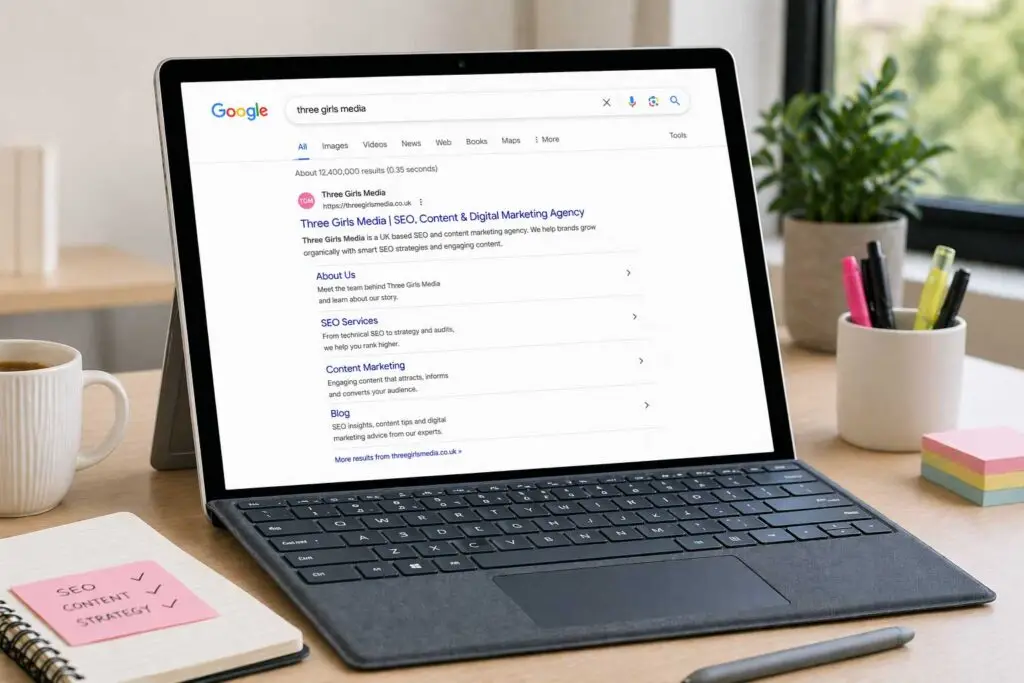
If you’ve ever searched for a brand name and seen a cluster of extra links appear beneath the main result, you’ve seen sitelinks in action. They look almost like a mini site directory sitting right inside Google’s search results — and they’re one of the most coveted pieces of SERP real estate you can get without paying a penny for ads.
But here’s the catch: you can’t just flip a switch and turn them on. Google decides when and where to show them, and they’re not handing them out generously. That said, there’s a clear set of signals that make sitelinks far more likely to appear — and understanding them can meaningfully change how your brand shows up in search.
What Are Google Sitelinks, Exactly?
Sitelinks are additional links that appear beneath the main organic result (or paid ad) for a website in Google Search. They typically surface when someone searches for a brand name directly, and they point users to specific pages deeper within that website — things like a login page, pricing, contact, or product categories.
According to Google, they only show sitelinks when they think it’ll genuinely help the user — which is part of why earning them signals a level of trust that’s worth chasing.
The Different Types of Sitelinks You’ll See in the Wild
Not all sitelinks are the same. Google serves a few distinct formats depending on the context.
Standard Organic Sitelinks
These are the most recognizable kind — up to six links that appear below the top organic result for a branded query. Each one often includes a short descriptive snippet. They only show up for the number-one result, so ranking well for your own brand name is non-negotiable here.
Inline (One-Line) Sitelinks
These appear as a single horizontal row of links beneath an organic result. They’re more compact, have no snippet text, and unlike standard sitelinks, they can appear on results below the top position. They also sometimes link to specific sections within a page rather than entirely separate URLs.
Sitelinks Search Box
Some branded results show a search input field directly in the SERP, letting users search a site without clicking through first. It’s a powerful trust signal, though not every brand will want it. If you’d rather opt out, adding <meta name="google" content="nositelinkssearchbox" /> to your homepage tells Google to remove it (though it may take some time to disappear).
Paid Sitelink Assets
These are the ad equivalent — managed through Google Ads as assets attached to your campaigns. You set the links and copy yourself, though Google still decides whether to actually display them. They can appear in both search ads and YouTube mobile ads.
Why Sitelinks Are Worth Pursuing
The case for sitelinks isn’t complicated. They take up more vertical space in the SERP, which alone pushes competitor results further down the page. But beyond the visual real estate, they serve up more relevant entry points for different types of visitors — the person who wants to log in immediately, the one comparing prices, the one looking for support.
That combination of greater visibility and more tailored click destinations is exactly why sitelinks tend to lift click-through rates. You’re essentially giving searchers a shortcut to what they actually want, which reduces friction and builds confidence in your brand before they’ve even landed on your site.
There’s also a brand perception angle. Seeing a well-organized set of sitelinks signals that Google has indexed your site thoroughly and trusts its structure enough to surface it prominently. For users who don’t know your brand well, that implicit endorsement matters more than you might think.
How to Earn Google Sitelinks: The Tactics That Actually Matter
Build a Site Architecture That Makes Logical Sense
Google has said outright that it’s less likely to show sitelinks if your site’s structure is confusing or unclear. Website architecture that groups related content into intuitive hierarchies — homepage → category → subcategory → individual pages — gives Google a clear map of what your site is about and which pages matter most.
Think of it this way: if a crawl bot can’t intuitively understand the relationship between your pages, there’s no way Google will confidently surface those pages as sitelinks to a real user.
Submit an XML Sitemap to Google Search Console
An XML sitemap is essentially your site’s table of contents handed directly to Google. It tells crawlers which pages exist and should be indexed. Most CMS platforms like WordPress, Shopify, or Squarespace generate one automatically, but you’ll still want to submit it manually through Google Search Console under Indexing → Sitemaps.
It’s a low-effort step that removes any ambiguity about what you want indexed — and anything that makes Google’s job easier works in your favor.
Use Internal Links to Signal Which Pages Matter
Internal linking is one of the most underused tools in SEO, and it’s particularly relevant for sitelinks. When you consistently link to a page from other parts of your site, you’re telling Google it’s important. Pages that appear frequently as internal link destinations are more likely to be understood as high-value — which is exactly what sitelinks are supposed to reflect.
Prioritize links to pages that represent your brand’s main offerings: core service or product pages, your About section, pricing, tools, or contact pages. These are the kinds of destinations that make sense as sitelinks because they serve real user needs quickly.
Write Anchor Text That Actually Describes the Destination
Anchor text — the visible, clickable words in a hyperlink — tells Google what the linked page is about. Vague text like “click here” or “read more” doesn’t give search engines much to work with. Specific, descriptive anchor text like “our SEO audit checklist” or “compare pricing plans” does.
Google’s own developer documentation recommends concise, descriptive anchor text as a best practice for sitelinks specifically. You don’t need to keyword-stuff every link — a natural mix of exact-match, partial-match, and branded anchor text is more than enough.
Optimize Every Title Tag With Purpose
A page’s title tag is often what Google uses as the clickable label in search results — including in sitelinks. If your title tags are vague, duplicated, or stuffed with unnecessary words, Google may not confidently associate a page with a specific purpose.
Aim for title tags between 50–60 characters. Lead with the most descriptive keyword. Make sure each page has a unique title that actually communicates what that page is for. This helps Google (and users) understand what they’re clicking into, which in turn makes that page a better candidate for a sitelink slot.
Rank Strongly for Your Own Brand Name
Sitelinks almost exclusively appear on top-ranking results for branded searches. If your site isn’t the first result when someone searches your brand name, you won’t see sitelinks — it’s that direct.
Improving your brand ranking involves more than just on-site SEO. It means building brand awareness through consistent content, social media presence, digital PR, and earning mentions and backlinks that establish your site as the definitive source for queries about your brand. The more authoritative your site appears in Google’s eyes, the more likely it is to rank first — and unlock sitelinks as a result.
Add Structured Data (Schema Markup) to Your Pages
Schema markup gives Google richer context about your pages’ content. While it doesn’t directly trigger sitelinks, it helps Google understand what your site is about at a granular level — and that deeper understanding can contribute to the trust signals that make sitelinks more likely.
Relevant schema types to implement include Organization (for your homepage), Product (for product pages), Article (for blog posts), and LocalBusiness (if you operate a physical location). If you’re on WordPress, plugins like Yoast or Rank Math can handle this without touching code.
A Note on What You Can’t Control
It’s worth being direct about this: there is no guaranteed method to force sitelinks into existence. Google’s algorithm makes the call, and even sites that do everything right don’t always see them. What you can do is remove the friction that’s stopping them from appearing — through clear architecture, smart internal linking, well-crafted titles, and a strong brand presence.
If you want to track which of your keywords already trigger sitelinks (or which ones don’t yet), tools like Semrush’s Organic Research let you filter by SERP feature, so you can see exactly where you stand and identify the gaps worth targeting.
Sitelinks won’t transform your SEO overnight, but they are a compounding advantage — more visibility, more trust, more clicks, all from the same organic ranking. And the work you do to earn them (cleaner architecture, smarter linking, better title tags) makes your entire site perform better regardless. That’s what good SEO infrastructure looks like.
Related reading: Content Creation Is Harder Than It Looks — Here’s How to Actually Do It Right, Proven Ways to Boost Your Website Traffic in 2026.